
How to streamline conference and training requests from your personnel
A firefighter forwards a brochure for a hazmat conference. A captain asks in the hallway whether two of their crew can go to a state chiefs' meeting. A paramedic emails a registration link at eleven at night. Each one needs a decision, a budget line, shift coverage and, eventually, a record that they went. Most of that happens in email, which is why conference requests take up so much of an administrator's week.
What fixes it is one conference request form, one approval route, and one place where the decision, the cost and the attendance end up. This guide walks through setting that up in a fire or EMS department, in the order that works.
The short answer: one conference request form, one route, one record
Stop taking conference requests by email. Give every member the same conference request form, send it down the same approval route every time, and put the decision, the cost and the attendance on the member's training record. Do that and a year of approvals turns into a report on who your department invested in, instead of a search through someone's inbox.
The same structure handles every kind of training request: a national conference, a two day state class, a National Fire Academy course or an instructor certification. What changes from one to the next is the cost and the approval route, not the process.
What goes wrong when conference requests arrive by email
Nothing about a single conference request is hard. The trouble is volume and memory. A mid-sized department can field dozens of requests a year, many of them clustered around the same few fire conferences, and each one raises the same questions: is it relevant to this member's development, does the budget cover it, can the shift be covered, and did we say yes or no to the last person who asked for the same thing?
In email, the answers to those questions are scattered. The request is in one inbox, the budget is in a spreadsheet, the shift calendar is in the scheduling system, and the decision is in a reply that nobody can find eleven months later. Four problems follow from that:
- Requests stall. A request sits with an approver who's on leave, and the early registration rate expires.
- Decisions drift. Two members ask for the same class and get different answers, because different people decided.
- Costs don't add up. Registration is visible, but travel, lodging, per diem and the overtime to backfill the shift are tracked somewhere else, if at all.
- Attendance never makes it back. The member goes, the certificate stays in their bag, and the training hours never reach their record.
The last one costs the most. Hours that don't reach the record can't count toward certification renewal or ISO training credit, and a department that can't show who it sent where has a hard time answering a grievance about unequal access to development.
Step 1: build one conference request form for every training request
A conference request form should capture six things: who's asking, what the event is, why it matters to their development, what it will cost in full, how their shift gets covered, and how they'll share what they learned. Use the same form for conferences, classes and certifications, so every training request can be compared and reported on the same way.
Most templates you'll find online are built for office staff. A fire department version needs two sections they leave out: shift coverage, and the certification or continuing education the event counts toward. Here's what goes in each section.
Requester and event
Name, rank, station and shift. Then the event name, host, dates, location, and whether it's in person or online. Add a link to the event page so the approver doesn't have to search for it.
Why it matters
Ask the member to tie the request to something on their record: a career path step, a certification they're working toward, a renewal that needs continuing education hours, or a special team they serve on. A request that says "required for hazmat technician renewal" is easier to approve, and easier to defend later, than one that says "looks useful". This section does the job a conference justification letter does in other organizations, without the letter.
Full cost
Registration, travel, lodging, meals or per diem, and the overtime cost of backfilling the member's shift. Backfill is the cost most forms leave out, and in a fire department it's often larger than the registration fee.
Shift coverage
Which shifts the member will miss, and whether minimum staffing holds without overtime. If the member sits on a special team, note whether the team still meets its own minimum while they're away.
Report back
How the member will share what they learned: a company drill, a written summary, or a session at the next officers' meeting. Agreeing this up front makes the department's investment reach more than one person.
| Section | Fields | Why the approver needs it |
|---|---|---|
| Requester and event | Name, rank, station, shift, event, host, dates, location, link | Identifies the request and the days at stake |
| Why it matters | Career path step, certification, continuing education hours, team role | Shows whether the event serves a goal already on the record |
| Full cost | Registration, travel, lodging, per diem, backfill overtime | Lets the budget holder see the real number |
| Shift coverage | Shifts missed, minimum staffing, special team minimums | Lets operations confirm coverage before anyone books |
| Report back | Format and date | Turns one member's training into the crew's |
Conference request form, training request form or travel request form?
Many departments run three separate documents: a training request form for classes, a conference request form for events, and a travel request form for anything out of town. The member fills in the same details three times, and the approver sees three partial pictures. One request with an optional travel section does the job of all three, and the travel request form becomes a section of it rather than a separate document. If your city requires its own travel authorization form for out-of-town trips, attach it to the approved request rather than starting a separate process, which is covered in Step 4.
Step 2: route each training request to the right approver
Write down who approves what, and base it on cost and time away rather than on who the member happens to ask. Most departments need three or four levels: the company officer for coverage, the battalion or division chief for relevance, training for the fit with the plan, and the budget holder above a set cost.
Here's a starting point. The thresholds are examples; set yours to match your budget and your city's purchasing rules.
| Training request | Approval route |
|---|---|
| Free or online, on duty, no coverage needed | Company officer |
| Local class, under $500 all in | Company officer, then training officer |
| Regional conference or class, $500 to $2,500 | Company officer, battalion chief, training officer |
| National conference, over $2,500, or out of state travel | Company officer, battalion chief, training officer, deputy chief or budget holder |
Two rules keep the route moving. First, every step has a deadline, so a request doesn't sit while an approver is on leave; name a delegate for each role. Second, the member can see where their request is. Most "did anyone look at my request?" emails disappear once members can check the status themselves.
Step 3: decide every conference request on the same reasons
Approvers don't need a scoring formula, but they do need the same questions in front of them every time. Agree them once and put them on the training request form, next to the approve and decline buttons:
- Does this serve a goal already on the member's record, such as a career path step, a certification or a renewal?
- Is it required, or is it development? Required training comes first.
- Does the budget line cover the full cost, including backfill?
- Does the shift, and any special team the member serves on, keep its minimum staffing?
- When did this member last attend something funded, and who hasn't been sent at all?
Record the reason with each decision, including declines. "Declined, budget exhausted for this quarter, resubmit in July" is a decision a member can live with. A request that simply never gets an answer isn't. If your collective bargaining agreement or MOU says anything about educational leave or tuition, check that your reasons match it before a grievance tests them.
Step 4: the travel authorization form and shift coverage, after approval
Approval is a decision about the training. The travel authorization form, the booking and the coverage come after it, and they should start from the approved request instead of from a blank page. That way the dates, cost and justification are entered once.
Many cities require a travel authorization form before anyone books out-of-town travel, and some require it before registration too. Check your city's rules and fold them into the route in Step 2, so the travel request form goes to finance already carrying the approval. For meals and lodging, many cities follow the federal GSA per diem rates for the destination; if yours does, put the rate on the request so the estimate matches what finance will reimburse.
Travel time is the question that catches departments out. Under the Fair Labor Standards Act, travel that keeps an employee away from home overnight counts as work time when it cuts across their normal working hours, and fire departments often have work periods that don't match a standard week. Ask your HR department how travel days are paid before you approve the first out-of-state conference, and put the answer in writing.
Finally, schedule the backfill when the request is approved, not the week before the event. The shift calendar should show the member as away for training, so the overtime is planned instead of found.
Step 5: close the loop after the event
This is the step most departments skip, and it's the one that pays for the rest. Within a week of the member getting back:
- Confirm attendance. Mark them as attended, partially attended or a no-show.
- Attach the certificate. Scan or upload it to the member's record, not to an email thread.
- Credit the hours. Log the training hours against the right categories, so they count toward continuing education, ISO training credit and any certification renewal.
- Reconcile the cost. Replace the estimate with the actual spend, including the overtime that was paid.
- Hold the report back. Log the drill or summary the member agreed to deliver.
If your department reports training for certification renewal through your state fire training agency, the certificate and hours on the record are what you'll need. Keeping them in your training tracking software, on the member's record, means you aren't chasing paperwork when renewals come around.
Step 6: report on a year of conference requests
Once every training request runs through the same form and ends on the same record, the year answers questions that used to take days:
- What did we spend on outside training, per member, per rank and per station, including overtime?
- How many requests did we approve and decline, and for what reasons?
- Who has never been sent to anything outside the department?
- Which fire conferences did members rate as worth sending people to again?
- How many training hours came from conferences and outside classes, and did they reach the record?
Departments that run this report for the first time often find the spend was less even than they assumed. A handful of members account for most of it, usually the ones who ask. That's useful to know before the next budget cycle, and it's the answer you'll want ready when someone asks whether development opportunities are fairly shared.
Planning the year around fire conferences
Most of the cost and coverage pressure comes from a few big fire conferences a year, and they're on the calendar long before anyone submits a request. National events such as FDIC International and the conferences run by the International Association of Fire Chiefs, your state fire chiefs' and fire instructors' conferences, and courses at the National Fire Academy can all be planned for.
At budget time, list the fire conferences you expect to send people to, how many seats, and roughly who. Open requests for each one on a set date, so members compete on the same terms instead of first come, first served. Hold back part of the training budget for the requests nobody predicted, which are often the most useful.
Where a spreadsheet stops and training tracking software starts
A shared spreadsheet and an online training request form will get you through Step 1 and most of Step 2. Plenty of departments start there, and it's a real improvement on email. The limits show up in Steps 5 and 6, because the spreadsheet holds requests and the training record lives somewhere else. Someone has to copy the attendance, the certificate and the hours across by hand, and that's the step that stops happening after the first busy month.
Training tracking software closes that gap by putting the request and the record in the same place. When you're looking at options, the test is simple: after the event, does the member's record update from the request, or does someone retype it? Look for training tracking software that handles the request, the approval, the cost and the hours together, and runs alongside whatever course library you already use.
Ask two more things. Can the approver see the member's certifications and career path while deciding on the training request? And can you report spend across every conference request for the year without exporting anything? If either answer is no, you'll still be keeping the second spreadsheet.
Should I build this in Google Forms or buy software?
A Google Form is a fine way to collect a conference request, and it's free, so it's where many departments start. The trouble comes after the request is submitted. The responses land in a sheet that isn't connected to your training records, certifications or career paths, so it becomes one more place for data to get lost.
The appeal is easy to see. You can build a conference request form in Google Forms in an afternoon, share the link, and have responses coming into a spreadsheet by the end of the week. For collecting the request, that works.
Everything after that is where it falls short. The form doesn't know who the member is, what they're certified in or what career path they're on, so the approver still looks all of that up somewhere else. Approvals end up back in email, or in a column someone has to remember to update. When the member comes back, the attendance, the certificate and the hours have to be copied by hand into whatever holds the training record, and every copy is a chance for that record to fall out of date. Over time each new form adds another sheet that only one person knows about, and when that person moves on, the history usually goes with them.
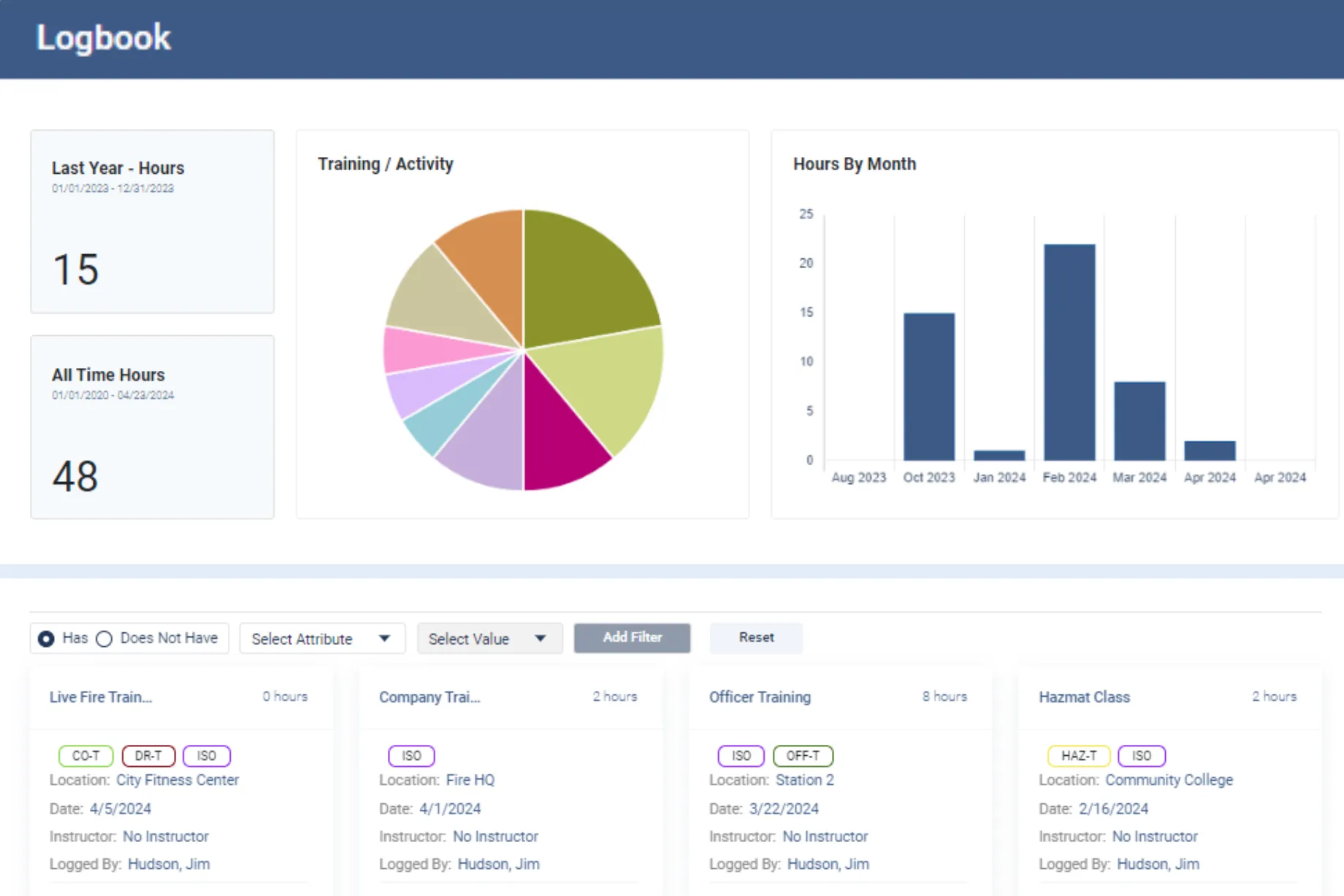
Essential Personnel solves that by keeping the request in the same system as the member's record. Training Events handles the request, the approval and the cost, and the certifications, Logbook hours and career path it touches sit on the same employee profile, so there's nothing to copy across and no separate sheet for the data to get lost in.
How Essential Personnel handles conference requests
Essential Personnel was founded in 2020 in Wilmington, North Carolina by two firefighters. Their training event management streamlines conference requests and the scheduling of internal classes, and it sits on the same employee record as certifications, task books and training hours, so the request and the record are never in different places.
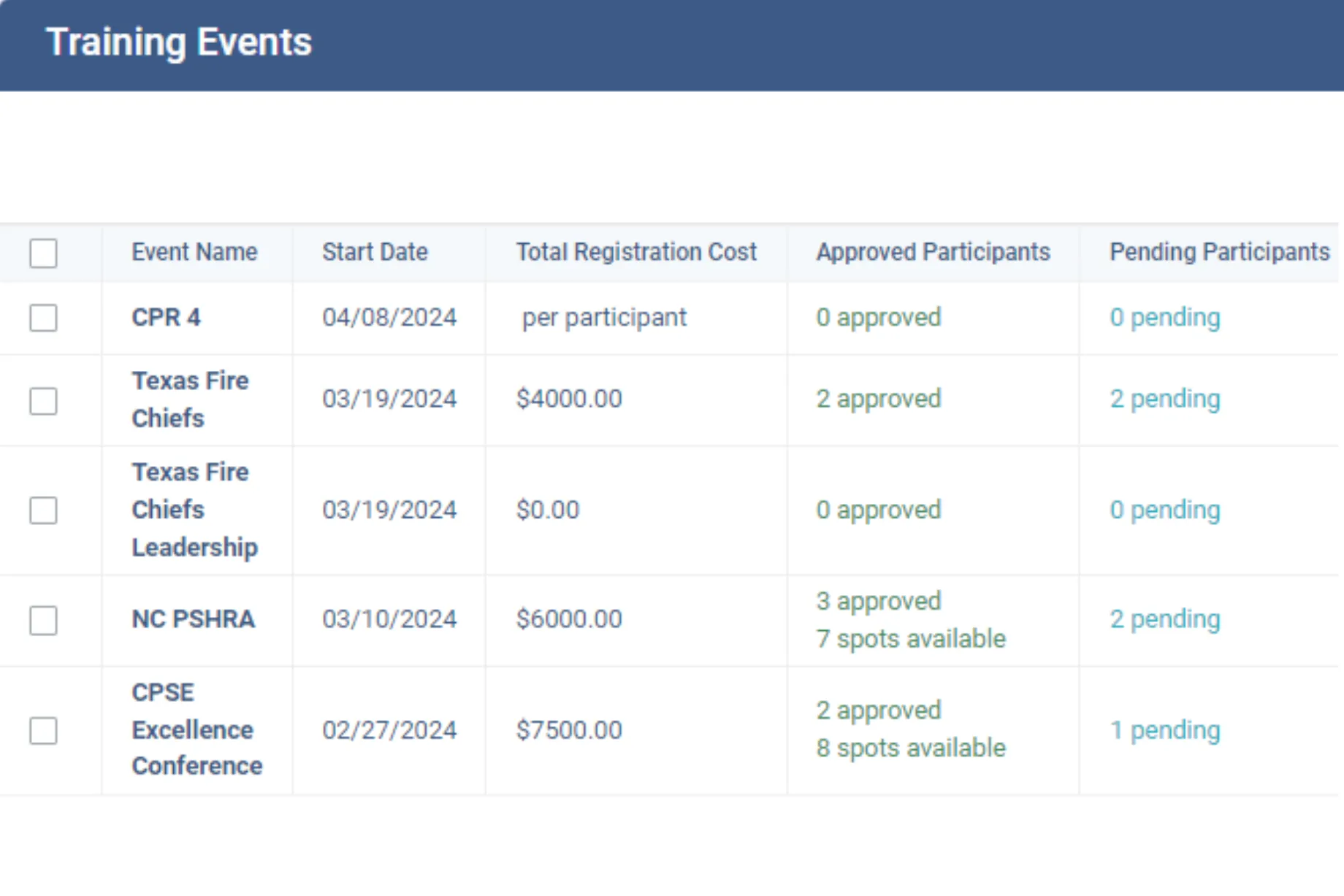
Training Events
Create an event, set the class size, and manage requests and approvals while tracking the cost. Events integrate with Outlook and Google Calendar.
Logbook
Records training hours and activities against custom goals and benchmarks, with identifiers such as ISO categories for sorting and reporting.
Certifications
Tracks credentials, expirations, completions and source documents, so a conference certificate lands on the record it counts toward.
Career Paths
Publishes the requirements for each rank or position, so an approver can see what a member is working toward when a training request arrives.
Myrtle Beach Fire Department moved training management for more than 200 personnel off paper and into Essential Personnel, including task books, certifications, awards and training events. Their deputy chief describes what the training events side changed.
"Efficiently managing our training events saves time and ensures our team is always prepared, allowing for strategic investment in their development."
Deputy Chief Brad Kempf, Myrtle Beach Fire DepartmentThis training tracking software is one part of EP's Talent Management suite, which covers the whole working life of a member on one record. Team building holds the org chart, roster, employee profiles, career paths, special teams and committees, and assignment requests. Performance holds 360 feedback, score reports, awards, leader's notes for coaching and counseling, and documents of record with their approval trail. Training holds certifications, task books and qualifications, field training, the Logbook and Training Events. So the conference a member attended sits beside their evaluations, their qualifications and the career path it was meant to serve, and nobody has to join those records up by hand.
It's also simple for a department to buy and run. EP is hosted in AWS GovCloud, CJIS aligned and SOC 2 Type II audited annually, so your IT staff has nothing to install, host or patch, and the security questions your city will ask already have documented answers. And it's available through GSA Advantage, NASPO, Omnia Partners, NCSA and VSA, so a purchase can ride an existing contract vehicle instead of a new bid.
EP is the system of record for training rather than a course library, and it runs alongside whichever course provider you already use. The fire and EMS overview covers the rest of the platform, and the career development guide compares how six systems handle development requests alongside promotion readiness.
Questions to ask before you buy software for conference requests
Take this list to every demo
- Show me a member submitting a conference request form from their phone or a station computer.
- Can one training request form cover conferences, classes and certifications?
- Does the travel request form start from the approved request, or from a blank page?
- Route a $3,000 out of state training request through three approvers while I watch.
- While I'm approving, can I see the member's certifications, career path and past training?
- Where does the full cost go, including travel and backfill, and can I change the estimate to the actual?
- After the event, how do the attendance, certificate and hours reach the member's record?
- Show me spend for the year by member, rank and station.
- Show me every member who hasn't attended an outside class or conference in two years.
- Can I cap seats for a conference and see pending and approved requests against the cap?
- Does it sync with our calendar?
- Is the price published, and what's the five year total including startup?
If a vendor answers the after-the-event questions by exporting a spreadsheet, the request and the record are still in two places, and you're looking at a form tool rather than training tracking software. The fire training software comparison covers how the main systems split between course delivery and the training record, and the talent management overview lists every module in the suite.
Frequently asked questions
Move them out of email and onto one conference request form that every member uses. Route each request by cost and time away to a named set of approvers, decide on the same written reasons every time, and record the decision, the full cost and the attendance on the member's training record. Then report on the year: spend per member, approvals and declines, and who hasn't been sent.
Six sections: the requester and event, why the event matters to the member's development, the full cost including travel and backfill overtime, the shifts the member will miss and whether minimum staffing holds, and how the member will report back. A fire department version should also name the certification or continuing education hours the event counts toward.
Set the route by cost and time away. A free or local class may only need the company officer and the training officer. A regional event usually adds the battalion chief, and a national conference or out of state travel adds the deputy chief or budget holder. Give every step a deadline and a named delegate so requests don't stall.
A training request form asks whether the member should attend. A travel authorization form, sometimes called a travel request form, is required by many cities for out of town trips and approves the travel spending once that decision is made. Start the travel authorization form from the approved training request so the dates, cost and justification are entered once.
Capture the full estimated cost on the request, including registration, travel, lodging, per diem and backfill overtime, then replace it with the actual spend after the event. When every request ends on the member's record, cost per firefighter, per rank and per station is a report rather than a reconciliation project.
Close the loop within a week of the event. Confirm attendance, attach the certificate to the member's record, and log the hours against the right categories, such as continuing education, ISO training or a specific certification renewal. Hours that stay on a certificate in someone's bag can't be counted when renewals come around.
Often, yes. Under the Fair Labor Standards Act, travel that keeps an employee away from home overnight counts as work time when it cuts across their normal working hours. Fire departments often use work periods that don't match a standard week, and union contracts can add their own rules, so confirm with HR how travel days are paid before approving out of town training.
Yes. Training event management in Essential Personnel streamlines conference requests and the scheduling of internal classes. You create an event, set the class size, and manage requests and approvals while tracking the cost, with Outlook and Google Calendar integration. Attendance, certificates and training hours sit on the same employee record through Certifications and the Logbook.
See it with your own conference calendar
Walk through training events, approvals and the training record with someone who's worked a shift. Call (910) 390-0011 or email info@essper.com.
About this article
Written by Scott Monroe, Chief Executive Officer & Co-Founder, Essential Personnel. Published 5 October 2026.
Essential Personnel makes the software described here, and the product screenshots are from the platform. The approval thresholds in Step 2 are examples. Suite contents, hosting and procurement details are taken from the published talent management, pricing and security pages, and the customer quote is reproduced from the published Myrtle Beach Fire Department story. Travel time guidance summarizes the U.S. Department of Labor's published rules and isn't legal advice.
