
How a special operations chief tracks teams, committees and capabilities
Fire department special operations is the part of the department that doesn't fit on the org chart: the hazmat team, the technical rescue team, swiftwater and dive, USAR, drone, and the committees that keep all of it funded and current. As the special operations chief you're accountable for what those teams can actually do tonight. The trouble is that the answer usually lives in four places at once.
The team leader has the member list. Training has the certifications. The shift calendar has who's on duty. And the standard the team is supposed to meet lives in a binder. Ask how many current swiftwater technicians are on B shift and the honest answer involves a phone call.
The short answer for fire department special operations
Track three things separately and join them on one personnel record: who's on each team, what each member is currently qualified to do, and what the team has to be able to field. A team's capability is the result of checking the second against the third, shift by shift. Keep capability as a separate list and it drifts the first time a certification lapses.
Everything below is how to set that up, in the order that works. It applies to every discipline in fire department special operations, and it applies to committees too, with one change to what "capability" means.
Why a team roster isn't a capability record
A team roster tells you who's a member. A capability record tells you who's a member and currently holds the qualifications the team needs. Those two lists start out identical on the day the team forms, and then they drift apart, one expired card at a time.
Take a dive team of ten. Two members let their dive medical lapse over the summer, one transferred to fire prevention and nobody took them off the list, and one is on light duty. The roster still says ten. The team can put six in the water. If the team leader knows that, it's because they keep a second list in their head, and that second list is the one you need.
The same thing happens to every hazmat team and technical rescue team, and it's worse when members sit on more than one team. A firefighter who's on both the technical rescue team and the drone team appears in two rosters, two training plans and, usually, two spreadsheets. Change their status in one and the other is wrong.
The fix is to stop treating the roster as the record. The record is the member's own file, with their certifications and expirations on it, and the team list is a view of it.
Step 1: write down what each hazmat team and technical rescue team has to field
Before you can measure capability you have to define it. For each team, write down the positions it needs, the qualification each position requires, and the minimum number you need available, per shift or per callout. Use a published standard wherever one exists, so the definition holds up when someone questions it.
Most of the definitions already exist. You don't have to invent them, you have to adopt them and write down which ones you adopted.
- NFPA 1006 sets the professional qualifications for individual technical rescuers, discipline by discipline: rope, confined space, trench, structural collapse, vehicle, water, dive and more. This is what a technician on your technical rescue team is certified against.
- NFPA 2500 covers the organization's side of technical rescue: the operational capability levels the department commits to and the training behind them. It was published in 2022 and pulled together the former NFPA 1670, 1983 and 1858. NFPA 1006 remains its own document.
- NFPA 470 is the hazmat standard. The 2022 edition combined the former NFPA 472, 473 and 1072, so a hazmat team's awareness, operations and technician competencies now sit in one document.
- The FEMA Resource Typing Library Tool defines what a deployable team looks like by type. The Swiftwater/Flood Search and Rescue Team definition, for example, sets a minimum of 16 people for Type 1, 12 for Type 2 and 6 for Type 3, with each type building on the qualifications of the one below it.
Put that together and each team's definition fits on one line. Here's what it looks like for four common teams.
| Team | Member qualification | What to write down as the requirement |
|---|---|---|
| Hazmat team | NFPA 470 hazmat technician | Minimum technicians per shift, plus who's qualified to act as team leader and safety officer |
| Technical rescue team | NFPA 1006 technician, by discipline | Technicians per discipline per shift, since a rope technician isn't a trench technician |
| Swiftwater and flood | NFPA 1006 water rescue, plus boat operator | Technicians and boat operators per shift, and the FEMA type you can field on a full callout |
| Dive team | NFPA 1006 dive technician, current dive medical | Divers and a tender per callout, and the medical expiry as a hard stop |
Two things make this step pay off later. First, write the minimums in numbers, not adjectives. "Adequately staffed" can't be checked. "Two hazmat technicians on every shift" can. Second, if you're working toward accreditation with the Center for Public Safety Excellence, technical rescue and hazmat programs are assessed as their own criteria, and the reviewers will ask how you know the team can do what the program document says. The written requirement is the first half of that answer.
Step 2: build the skills matrix from the certification record
A skills matrix is a grid with members down one side, required qualifications across the top, and the status of each qualification in every cell. For a special operations team it's the single most useful view you can have, as long as each cell is drawn from the member's certification record instead of typed in by hand. Keeping that record is what certification tracking software is for, which is why the matrix and the certifications belong in the same system.
The format isn't new. Manufacturing has used a skills matrix for decades to plan coverage on a production line, and the logic carries straight over: you're asking which people can do which jobs, and where you're one absence away from a gap. What's different in the fire service is that the qualifications expire on their own. A manufacturing skills matrix can go months without changing. Yours changes every time a card expires, whether anyone updates it or not.
Here's a skills matrix for a nine member swiftwater team spread across three shifts. It's an example, but the pattern is one most chiefs will recognize.
| Member | Shift | Swiftwater technician | Boat operator | EMT |
|---|---|---|---|---|
| A1 | A | Current | Current | Current |
| A2 | A | Current | Not held | Current |
| A3 | A | Current | Not held | Current |
| B1 | B | Current | Expires in 40 days | Current |
| B2 | B | Lapsed | Not held | Current |
| B3 | B | Current | Not held | Current |
| C1 | C | Current | Not held | Expires in 25 days |
| C2 | C | Current | Not held | Current |
| C3 | C | Lapsed | Lapsed | Current |
The roster says nine members, three to a shift, which looks balanced. The skills matrix says something else, and you'll see what in Step 3. Notice too that every cell is a status with a date behind it, never a checkmark. A checkmark records that someone was qualified once. A status with an expiry records whether they're qualified now.
Skills matrix or training matrix?
The two terms get used interchangeably, but they answer different questions. A training matrix shows which training each role requires and who's completed it, so it's a planning tool for the training division. A skills matrix shows who's currently qualified to fill each position on the team, so it's an operational tool for you. You need both. The training matrix tells training what to schedule. The skills matrix tells you what you can field. Built on the same record, a completed class in the training matrix becomes a current qualification in the skills matrix without anyone retyping it.
You'll also see "competency matrix" used for the same grid. The label matters less than the source of the data. A skills matrix kept in a spreadsheet is accurate on the day it's saved, and a training matrix kept in a second spreadsheet will disagree with it within a month.
Step 3: count capability per shift, not per roster
Capability is the number of qualified people you can field when the call comes, so count it the way calls come in: by shift. Compare each shift's current qualifications against the minimum you wrote down in Step 1, and the gaps show up as facts instead of hunches.
Say your requirement is two swiftwater technicians on every shift, at least one of them a boat operator. Run the example matrix against it.
- A shift has three current technicians and a current boat operator. Covered.
- B shift has two current technicians, because B2 lapsed, and its only boat operator expires in 40 days. Covered today, uncovered in six weeks unless B1 recertifies.
- C shift has two current technicians and no current boat operator. Not covered, and it hasn't been since C3's card lapsed.
Nothing about that is visible from the roster. It's only visible when the matrix is read against the requirement, shift by shift. That's also the conversation that gets a recertification class funded or a member moved: "C shift can't put a boat in the water" lands differently than "we're a bit thin on boat operators."
The same arithmetic tells you what you can promise a mutual aid partner or a state task force. Nine members clears the FEMA Type 3 swiftwater minimum of six on paper. Only seven of them are current technicians, so a full callout clears it by one, and one sick call puts you at the line.
Step 4: watch expirations ninety days out
Most capability gaps are visible months before they happen, because every certification has an expiry date. Look ninety days ahead, every month, and a lapse becomes a scheduling problem instead of an operational one.
Ninety days is long enough to get a member into a recertification class and short enough that the list stays manageable. Sort it by team and by shift rather than alphabetically, because what you need to know is which team loses coverage when a card expires. B1's boat operator card in the example matters more than C1's EMT card, because B1 is the only boat operator on B shift.
What certification tracking software has to do here
This step is where most departments outgrow the spreadsheet, because a spreadsheet can't tell you anything happened unless somebody opens it. Certification tracking software has to hold each certification against the member with its expiry date and the source document, so you can filter the whole roster by what expires in the next ninety days. Certification tracking software that keeps cards in a separate system from team membership leaves you joining the two lists by hand, which is the job you were trying to get rid of. And certification tracking software that can't show you the card itself, just a date someone typed, won't survive the first time a date is disputed.
Step 5: run selection and membership changes as tracked requests
Joining a team, leaving one, or transferring stations changes your capability, so treat each of those as a request with a record, not an email. The team list stays accurate because nobody has to remember to update it.
Most stale team rosters got stale the same way: a member transferred, retired or stepped down and the team list was a separate document nobody owned. When membership is held on the member's own record, a transfer carries their team memberships with it, and a departure takes them off every team at once.
Selection works the same way. A firefighter who wants a seat on the technical rescue team should be able to request it through a tracked path, with the request visible to the team leader and to you, and with a status anyone can look up. That gives you a waiting list you can actually see, it makes selection decisions easier to defend, and it means a request doesn't sit in an inbox while the person who sent it assumes the answer was no. Ask for it in any fire department software you look at.
Equipment belongs here too. Special operations members carry gear the rest of the department doesn't: harnesses, PFDs, dry suits, meters. Issue it against the member, not the team, so it follows them in and out. The NFPA 1850 guide covers how the same idea applies to turnout gear and SCBA.
Committees: the same structure, a different kind of capability
A committee is tracked the same way as a team, with a chair, members and assignments on each member's record. The difference is what capability means. For a team it's qualifications. For a committee it's representation and continuity: does it include the ranks, shifts and stations it's supposed to, and how many seats turn over this year?
Most fire department special operations programs carry a handful of committees too: an apparatus or equipment specification committee, a training committee, sometimes a standards committee or a peer support team. They fail in a predictable way. The chair leaves, the member list is in the old chair's email, and the committee quietly stops meeting.
For each committee, write down its purpose, its chair, its members, when each member's term ends, and who it's supposed to represent. An apparatus committee that's meant to include an engineer from each shift can be checked against that the same way a hazmat team is checked against its minimum. Essential Personnel's guide to a standards committee suggests three to seven members chosen from across the organization, which is a good default size for most committees.
Where a spreadsheet stops and skills tracking software starts
Plenty of fire department special operations programs run on spreadsheets, and a spreadsheet is a reasonable place to start. The limit shows up when the questions get specific. Here's what each approach can answer.
| The question | A team spreadsheet | Skills tracking software on the personnel record |
|---|---|---|
| Who's on the hazmat team? | Yes, if someone updated it after the last transfer | Yes, and membership follows the member through transfers |
| Which members are current on their technician certification? | Only if someone copies the dates across from training | Read from the certification record, with the card attached |
| Does C shift meet the minimum tonight? | Needs a second sheet joined to the shift calendar | Filter the roster by shift and qualification |
| Whose cards expire in the next ninety days? | Only if someone remembers to look | A filter you run each month across every team at once |
| Who's asked to join the technical rescue team? | Lives in somebody's inbox | A tracked request with a status |
Skills tracking software built for general business can fill in some of that, but it doesn't model rank, shift or task books. Skills tracking software is worth buying only if it reads from the same record your training division already keeps. Otherwise you've traded one spreadsheet for two systems. That's why most departments end up looking at fire department software rather than a standalone skills tracking software product.
How Essential Personnel handles it
Essential Personnel was founded in 2020 in Wilmington, North Carolina by two firefighters, and the parts described above are built into one platform on one employee record. That's the reason the skills matrix stays current: nobody keeps it. It's a view of certifications and memberships that training and the team leaders are already keeping accurate.
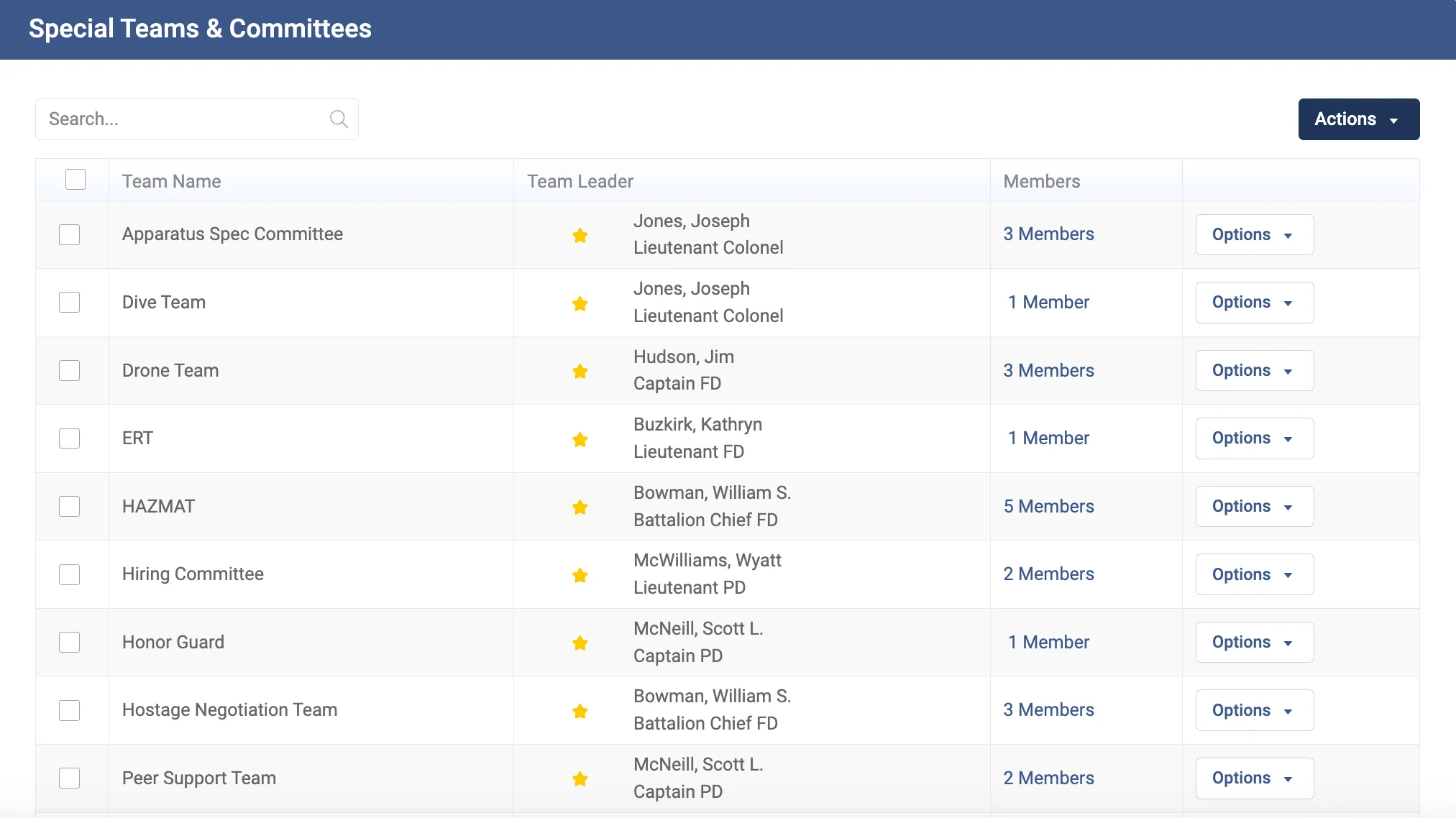
Special Teams and Committees
Create custom teams and committees, name a leader, and track memberships and assignments. Membership lives on the member's record, so it travels with them.
Roster filters
Filter the whole roster by certification, qualification and other metrics. That's the query behind the per shift capability count in Step 3.
Training and certifications
Task books, ISO hours, certifications and qualifications on the employee profile, with expirations and source documents attached. It's certification tracking software for every team at once.
Assignments
Members submit transfer and special team requests through a tracked workflow instead of by email, and each request has a status.
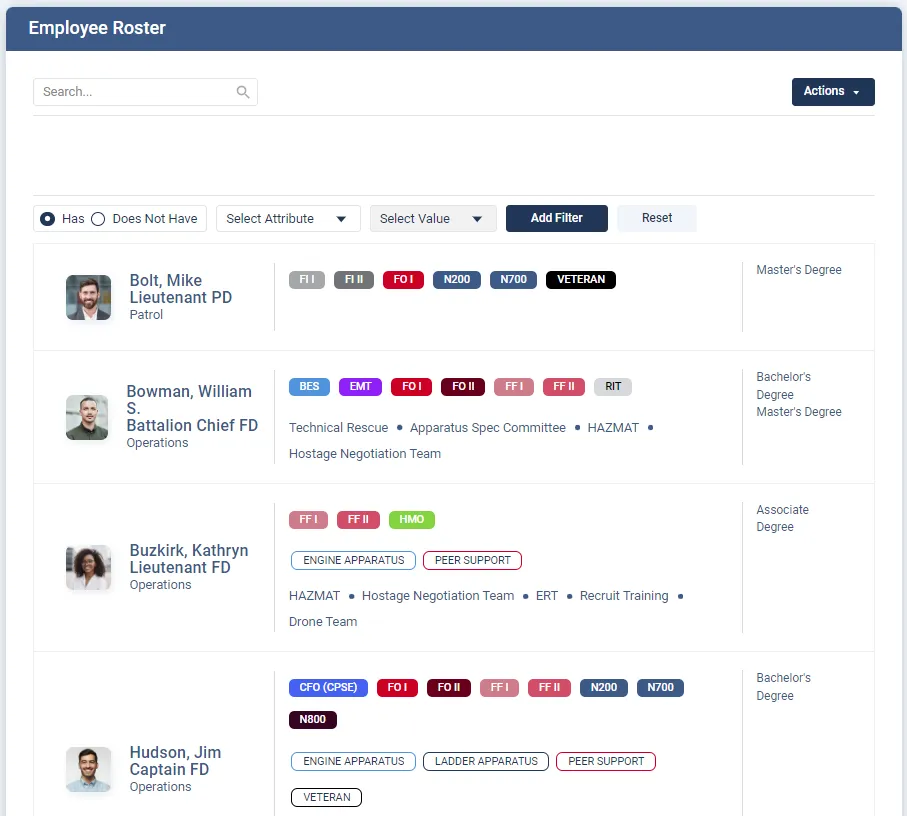
Because this is fire department software built on one record, it also holds evaluations, awards, assigned equipment and wellness data, so the member who sits on the dive team and the drone team is one record, not three. The org chart guide covers how specialty teams sit alongside the reporting structure, and the talent management overview covers career paths and promotion eligibility, which draw on the same qualifications.
Myrtle Beach Fire Department tracks task books, training events, certifications, awards and performance documents for more than 200 personnel in Essential Personnel, and their leadership puts the result in operational terms.
"Having this level of visibility is crucial for us. It enables our leaders to assess an individual's overall competency quickly. We can now put the right people in the right roles without the guesswork."
Deputy Chief Brad Kempf, Myrtle Beach Fire DepartmentIf you're new to Essential Personnel, Special Teams and Committees is one of many tools inside it. It belongs to the Talent Management suite, which also holds the org chart, roster, employee profiles, career paths and assignment requests, performance tools such as 360 feedback, awards, leader's notes and documents of record, and training, from certifications and task books to field training, the Logbook and training events. Around that sit three more suites: Safety and Wellness for incidents, exposures and early intervention, Guidance for policies and acknowledgements, and Equipment for assigned gear and inventory. A department can start with the piece it needs most and add the rest later, and every piece writes to the same employee record.
It's also fire department software that's simple to buy and run. EP is hosted in AWS GovCloud, CJIS aligned and SOC 2 Type II audited annually, so your IT staff has nothing to install, host or patch, and the security questions your city will ask already have documented answers. And it's available through GSA Advantage, NASPO, Omnia Partners, NCSA and VSA, so a purchase can ride an existing contract vehicle instead of a new bid.
EP is the system of record for training rather than a course library, and it runs alongside whichever course provider you already use. The fire and EMS overview covers the rest of the platform.
Questions to ask before you buy fire department software for special operations
Take this list to every demo
- Show me every team and committee a single member belongs to, on that member's record.
- Transfer a member to another station while I watch. What happens to their team memberships?
- Filter the roster to current hazmat technicians on one shift.
- Show me every certification across all my teams that expires in the next ninety days.
- Where does the certification card itself live, and who can see it?
- How does a firefighter request a seat on the technical rescue team, and where do I see that request?
- Can a team leader see their own team without seeing the whole department?
- Can I track a committee's chair, members and terms the same way as a team?
- Is the price published, and what's the five year total including startup?
- Which contract vehicles can we buy this through?
If a vendor answers the first three by exporting to a spreadsheet, you're looking at a reporting add-on rather than skills tracking software, and you'll be the one maintaining the skills matrix. Fire department software built on one personnel record answers them on screen. The product overview lists every module if you want to check the details before a call.
Frequently asked questions
Keep team and committee membership, each member's certifications and qualifications, and each team's written requirement on one personnel record, then read the qualifications against the requirement shift by shift. Define the requirement from published standards such as NFPA 1006 for technical rescuers, NFPA 470 for hazmat and FEMA resource typing for deployable teams. Build a skills matrix from the certification record rather than by hand, review expirations ninety days ahead, and run membership changes as tracked requests. Committees work the same way, except their capability is representation and term continuity rather than certifications.
It's a grid with team members down one side, the qualifications the team requires across the top, and the current status of each qualification in every cell, such as current, expiring on a date, lapsed or not held. Read by shift, it shows whether each shift can meet the team's minimum. It only stays accurate if each cell is drawn from the member's certification record, because fire service qualifications expire on their own.
A training matrix shows which training each role requires and who has completed it, so the training division uses it to plan classes. A skills matrix shows who is currently qualified to fill each position on a team, so the special operations chief uses it to know what the team can field. When both are built on the same personnel record, completed training updates the skills matrix without anyone retyping it.
For technical rescue, NFPA 1006 sets the professional qualifications for individual rescuers by discipline, and NFPA 2500 covers the organization's operational capability and training. NFPA 2500 was published in 2022 and combined the former NFPA 1670, 1983 and 1858. For hazmat, NFPA 470 combined the former NFPA 472, 473 and 1072 in its 2022 edition. Check which editions your state and your authority having jurisdiction have adopted.
FEMA resource typing defines what a deployable team looks like at each level, by minimum personnel, positions and qualifications, so a team requested through mutual aid or a state task force means the same thing everywhere. The Swiftwater/Flood Search and Rescue Team definition, for example, sets a minimum of 16 people for Type 1, 12 for Type 2 and 6 for Type 3. It applies whenever you offer your team outside your own jurisdiction, and it's a useful benchmark even when you don't.
Record each committee's purpose, chair, members, when each member's term ends, and which ranks, shifts or stations it is meant to represent. Hold membership on each member's record, the same way as a special team, so a transfer or retirement updates the committee automatically. Then check representation and upcoming term ends the way you would check a team's minimum staffing. Three to seven members is a sensible default size for most committees.
Yes. The Special Teams and Committees module creates and manages custom teams and committees, names a team leader, and tracks memberships and assignments on each member's record. Roster filters by certification and qualification, so you can see who on a given team or shift currently holds what the team needs. Certifications carry expiry dates and source documents, and the Assignments module handles transfer and special team requests as a tracked workflow.
No. Essential Personnel is the system of record for training rather than a course library, and departments run it alongside whichever course provider they already use. It holds training hours, task books, certifications with expirations and source documents, and qualifications, which is the data a special operations skills matrix is built from. If you need online course delivery, you'll need a course provider as well.
See it against your own teams
Walk through special teams, committees and the roster with someone who's worked a shift. Call (910) 390-0011 or email info@essper.com.
About this article
Written by Scott Monroe, Chief Executive Officer & Co-Founder, Essential Personnel. Published 5 October 2026.
Essential Personnel makes the software described here, and the product screenshots are from the platform. The swiftwater team in Steps 2 and 3 is an example. Standards references are to the NFPA and FEMA documents linked in the text. Suite contents, hosting and procurement details are taken from the published talent management, pricing and security pages, and the customer quote is reproduced from the published Myrtle Beach Fire Department story.
