
Policy acknowledgement software: your options for posting policies and confirming acknowledgement
You revise a general order, email it to the department and ask everyone to reply that they've read it. Half reply. A few reply to the wrong version. Eighteen months later an incident review asks whether one particular officer, firefighter or city employee had seen that policy before the day it mattered, and the answer is somewhere in an inbox that belonged to someone who has since retired.
Most agencies post policies and collect acknowledgements with tools that were never built for it: email, shared drives, paper sign-off sheets, online forms, the city's payroll system. This guide walks through each one, where it breaks down, and what a system built for the job does instead. The test is simple: can it show who read which version of a policy, and when? It's written for police and fire chiefs, accreditation managers and the city HR teams who support them.
The short answer: most agencies use tools that weren't built for this
Most police departments, fire departments and cities post policies by email or a shared drive, collect signatures on paper or through online forms, or lean on their HR or training system. None of those was built to show who received which version of a policy, on what date, and who still hasn't. Policy acknowledgement software built for public safety, such as Essential Personnel, does all three on the member's own record.
That record is what accreditation assessors, attorneys and civil service boards ask for. If your current setup can't produce it in a few minutes, that's the problem to fix.
What a policy acknowledgement record has to prove
A usable acknowledgement record binds four things together: the person, the document, the version they were shown, and the date and time they confirmed it. It also has to show the gaps, meaning everyone the policy was assigned to who hasn't acknowledged it yet.
On paper, a policy acknowledgement form does this one signature at a time. A member signs a sheet saying they received general order 4.12, the sheet goes in a file, and the file is fine until someone needs to know who signed the 2025 revision rather than the 2023 one. Policy acknowledgement software does the same job for every member and every revision at once, provided it keeps the old versions instead of overwriting them.
Here's what each piece of the record protects you from:
- The person. An acknowledgement tied to a login, not a shared station account, so nobody can say someone else clicked for them.
- The document and version. The text as it read on the day it was acknowledged. Policy tracking software that only stores the current version can't answer what the policy said on the date of an incident.
- The date. A timestamp you can export, so you can show the member was on notice before the event, not after.
- The gaps. A list of who hasn't acknowledged yet. Without it, you find out during an investigation.
Acknowledgement proves receipt, not understanding. No policy software can prove someone understood a document. What it removes is the defense that they never got it, and some agencies add a short quiz to high-risk policies to cover the rest.
How agencies post policies and track acknowledgement today
Most agencies and cities use one or more of these five workarounds, and plenty run two or three at once without meaning to. The table compares them with policy acknowledgement software built for public safety, on the record each one produces.
| How it's done | What it looks like | Version history | Acknowledgement record | Where it falls short |
|---|---|---|---|---|
| Email and a shared drive | Outlook, SharePoint, Google Drive | Only if someone manages filenames by hand | Reply emails, scattered across inboxes | No list of who never replied, no reliable versions |
| Paper sign-off sheets | A binder at each station, signatures in a file | Whatever copy is in the binder | One signature at a time, on paper | Rarely says which revision was signed, hard to search |
| Online forms and e-signature tools | Google Forms, Microsoft Forms, e-signature apps | Separate from the signature | A response per send, in a separate sheet | Every policy is a new form to build and reconcile |
| The city's HR or payroll system | An onboarding checklist in the HRIS | Usually none for general orders | A one-time signature at hiring | Built to pay people, not to track general orders and SOGs |
| A training platform's policy upload | A policy assigned like an online course | Often lost when the file is replaced | A completion next to course records | Built for course delivery, so revisions and re-acknowledgement are an afterthought |
| Policy acknowledgement software built for public safety | Essential Personnel | Every revision kept | Person, version and date on the member's own record | Built for this: one roster, one login, alongside training, performance and wellness |
1. Email and a shared drive
This is where almost everyone starts. The policy lives in a SharePoint or Google Drive folder, the announcement goes out by email, and replies stand in for acknowledgements. It falls apart on versions and gaps: filenames ending in "final" and "final2" aren't a version history anyone can testify to, and nobody can produce a list of who never replied without reading every thread. That's usually when departments start looking at policy tracking software.
2. Paper sign-off sheets and a binder
A signed policy acknowledgement form in a personnel file still feels safest to a lot of chiefs. The trouble is everything around it. The binder at Station 3 may be two revisions behind, the sheet rarely says which revision was signed, and pulling every signature for one general order means going through files by hand. It also does nothing to get a policy in front of a firefighter on a 24-hour shift.
3. Online forms and e-signature tools
A Google Form or a Microsoft Form with a checkbox turns into a quick policy acknowledgement form, and an e-signature app adds a signature trail. They're fine for one signature on one document. They weren't built to track hundreds of policies, assign them by rank or division, keep old versions beside each signature, or show who's overdue. Each new policy means another form to build and another set of responses to match against your roster.
4. The city's HR or payroll system
Many cities collect an employee handbook acknowledgement in the HR or payroll system at hiring. That system was built to pay people accurately, not to publish general orders that change through the year. It usually has no version history for department policy, no way to assign an SOG to one shift, and no easy way for a firefighter or patrol officer to open a policy from the station.
5. A training platform's policy upload
Some departments upload policies into their online training platform and assign them like a course. It gets a click and a timestamp, but the platform was built for course delivery. When a policy is revised, the old file is often replaced, and with it the record of who acknowledged what the policy said before.
The better option: policy acknowledgement software built for public safety
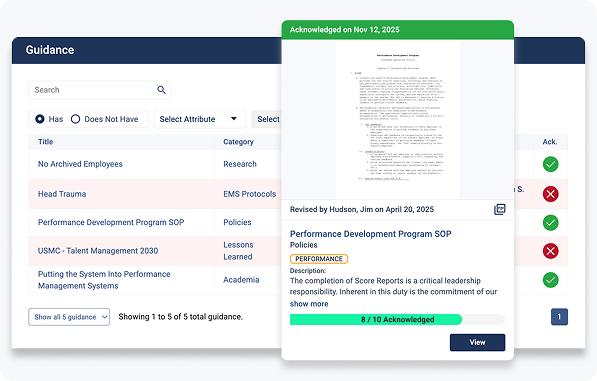
Essential Personnel treats policy acknowledgement as part of the personnel record. It publishes policies, memos and SOGs to the people they apply to, records each member's acknowledgement against the version they saw, keeps every revision, and lists who hasn't acknowledged. The same employee profile holds training, certifications, evaluations, wellness events and issued equipment, so there's one roster, one login and one place to answer a question about a member. The full detail is in How Essential Personnel handles it.
How to choose a policy management system for your agency
Start with what's actually broken. If your policies exist and the problem is proving who read them, you need a policy management system built for acknowledgement that keeps it on the same record as training, performance and discipline. Tools built for email, payroll or course delivery will keep leaving gaps.
Five questions settle most decisions:
- Who writes your policies? Counsel, a standards committee or an outside content service. Policy acknowledgement software publishes and tracks policy; it doesn't write it, so keep whoever writes yours today.
- How many systems hold your roster today? Every separate policy software, training system and HR file is one more roster to keep in sync. Pick the system that cuts that number, not one that adds to it.
- Can shift workers reach it? Firefighters and patrol officers don't sit at a desk. If acknowledging a policy takes a VPN and a desktop, it won't happen on a 24-hour shift.
- What does your security review need? Police agencies need a vendor aligned to the FBI CJIS Security Policy. Ask for hosting region, encryption and audit reports in writing.
- Is the price published? A published per-user price lets you compare five-year cost before you start a procurement process.
Whichever policy management system you look at, test it against these questions with your own policies, not a sample library. A policy management system that can't answer them in a demo won't answer them during an investigation.
Setting up policy tracking software, whichever option you pick
The software is the easy part. These six steps matter more than which product you buy, and they work the same in a shared drive as in dedicated policy tracking software. Do them before you move anything into new policy tracking software.
- Inventory what you have. List every policy, general order, SOP and memo in force, and retire the dead ones before you load anything. Moving years of documents into new policy software is a review, not a copy job.
- Name an owner and a review cycle. A standards committee that meets on a fixed schedule keeps policies from being revisited only after an incident. Essential Personnel has written about building a standards committee.
- Write your re-acknowledgement rule. A typo fix shouldn't pull the whole department back through acknowledgement. A change to use of force, driving or exposure reporting should. Decide the rule once, in writing.
- Assign by role. Send policies to the people they apply to, by rank, division or station, so the list of who hasn't signed is accurate.
- Cover new hires automatically. A new member should receive every policy in force on day one, along with the employee handbook acknowledgement, not just whatever was announced after they started.
- Report overdue acknowledgements weekly. Give supervisors the names on their shift, straight from your policy tracking software. It's a lot easier to fix in a week than in a lawsuit.
Employee handbook acknowledgement, general orders and city policy
An employee handbook acknowledgement is usually a one-time signature at hiring. Public safety needs more than that, because general orders and SOPs change through the year and have to reach people who work shifts. A city that runs police, fire and general government needs one place where both kinds of policy are posted and acknowledged.
Most cities end up with two systems: HR's employee handbook acknowledgement for every city employee, and the police or fire department's own system for general orders. That works until someone transfers, is promoted or is investigated, and the two records disagree about what they were told. Treat the handbook as one more policy set on the same platform, assigned to everyone, and the department policies as sets assigned by department and role. The employee handbook acknowledgement then lives on the same record as the general orders, and a revised handbook gets a fresh employee handbook acknowledgement from everyone instead of only from new hires.
The City of Pinellas Park, Florida uses Essential Personnel in both its human resources department and its police department, which moved its awards and recognition program onto the platform.


"Our partnership has been immensely valuable to the City and has had a significant impact on the development of all our employees."
LaSharon Hampton, HR Director, City of Pinellas ParkIs an electronic policy acknowledgement form legally valid?
Generally, yes, provided the electronic policy acknowledgement form is tied to the member's own login. The federal ESIGN Act of 2000 gives electronic signatures and records the same legal effect as paper, and 49 states have adopted the Uniform Electronic Transactions Act, with New York covered by its own statute. A click inside policy attestation software, tied to the member's own login and a timestamp, is how many accredited agencies now evidence receipt.
An electronic acknowledgement needs the same three things as a paper one: the person, the version and the date. Policy attestation software, sometimes called read-and-sign software, that records all three is stronger evidence than a signed sheet in a binder, because the sheet rarely says which revision it covered. Good policy attestation software also lets you export that record without the vendor's help, which matters when an attorney asks for it on a deadline. Your collective bargaining agreement or civil service rules may add their own notice requirements, so check those with your city attorney. This section is general information and isn't legal advice.
Accreditation works the same way. CALEA standards for a written directive system expect agencies to show directives are issued and received, and many accredited agencies track acknowledgement of each change electronically. Fire departments pursuing accreditation through the Center for Public Safety Excellence are asked for similar evidence. The law enforcement accreditation guide and the fire accreditation and ISO guide cover the rest of what assessors ask for.
Fire department policies and SOGs belong in the same policy software
Fire department policies tend to live in three places: city HR policy, department policy, and standard operating guidelines for the fireground. SOGs change more often than most policies, and an out-of-date copy on an apparatus is a safety problem as well as a records problem. Publish fire department policies and SOGs through the same policy software, with version control, so a revised SOG reaches every crew and you can see which shifts have picked it up.
NFPA 1201 expects a fire department to maintain written SOGs, and the NFPA 1201 SOG guide walks through structuring and tracking them. The same approach to fire department policies carries over to EMS protocols, which publish as their own category.

How Essential Personnel handles policy acknowledgement
Essential Personnel was founded in 2020 in Wilmington, North Carolina by two firefighters. Their Guidance module publishes policies, memos, announcements, lessons learned and research to the people they apply to, captures each member's acknowledgement as a verifiable record of receipt, and keeps every revision through version control. It's policy acknowledgement software built into the same employee record as training, performance, wellness and equipment.
Employee Acknowledgment
Members confirm receipt of each document, creating a record of the person, the document and the date that leaders can check at any time.
Version Control
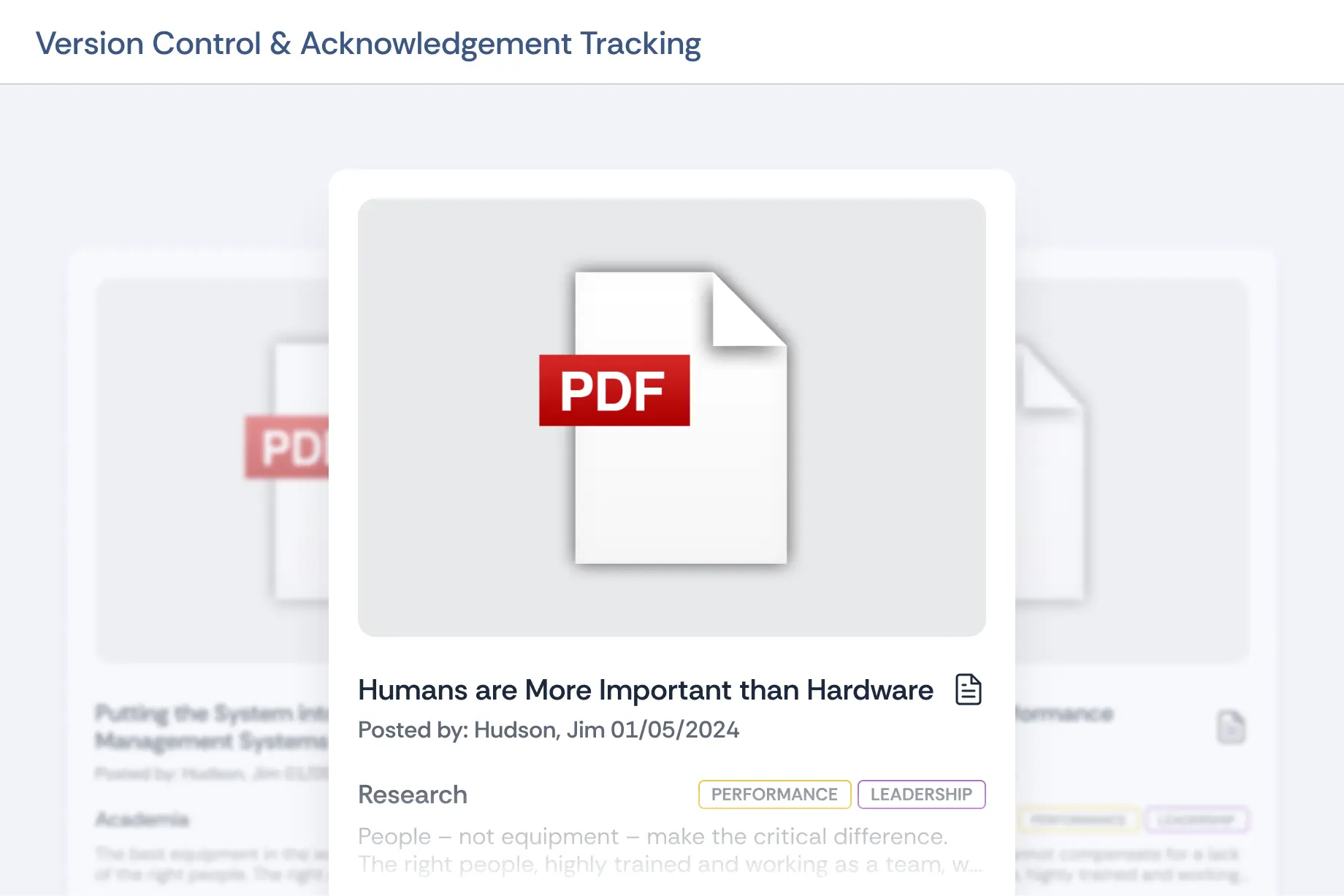
Every revision is kept and can be reverted, so you can show what a policy said on the day of an incident, not just what it says now.
New hire assignment
New employees are assigned the policies they need to acknowledge automatically, so nobody starts work outside the record.
Five document types
Policies, memos, announcements, lessons learned and research, in Adobe, Word or video format, with SOPs published the same way.
EP doesn't write policy. If you subscribe to a policy content provider, you'd keep it and publish through Guidance. What EP adds is that the acknowledgement sits beside everything else you know about the person, so an accreditation file, a promotion review or an internal affairs case pulls from one record. The law enforcement platform pairs it with performance and case management, and the talent management suite covers training and evaluations on the same profile.
"One of the most liked things is that we can store so much information on one platform that is easily accessible for convenience. We keep policies, ordinances, training, and multiple other things in Essential Personnel."
Tina Medlin, Interim Police Chief, Biscoe NC Police DepartmentIt's simple to buy and run. Guidance is published at $30 per user per year, so a 50-person agency taking only Guidance pays $1,500 a year, and the full platform is $175 per user with a one-time $3,000 startup fee. EP is hosted in AWS GovCloud, aligned to the FBI CJIS Security Policy and audited to SOC 2 Type II annually, with details on the security and compliance page. It's available through GSA Advantage, NASPO, Omnia Partners, NCSA and VSA, so a purchase can ride an existing contract vehicle.
The policy, training and performance guide covers how policy acknowledgement connects to certifications and evaluations.
Questions to ask in a policy attestation software demo
Take this list to every demo
- Publish a policy, revise it, and show me who acknowledged each version. Policy attestation software that can't do this live won't do it later.
- Pull up the version that was in force on a date I pick.
- Show me everyone who hasn't acknowledged a policy, filtered by shift or station.
- How does a new hire get every policy already in force?
- Can a firefighter or officer acknowledge from a phone or a station computer during a shift?
- Can I assign by rank, division or department across the whole city?
- Can I export the acknowledgement record for an assessor or an attorney without help from you?
- Where is the data hosted, and do you have a SOC 2 Type II report and CJIS alignment in writing?
- Is the price published, and what's the five year total including startup?
If a vendor can't pull a superseded version with its acknowledgements during the demo, assume their policy attestation software can't do it during a lawsuit either. When you're ready to see your own policies in it, the Essential Personnel team can walk you through it.
Frequently asked questions
Most agencies use email and a shared drive, paper sign-off sheets, online forms, the city's HR or payroll system, or a training platform's policy upload. None was built to show who read which version and when. Policy acknowledgement software built for public safety, such as Essential Personnel, records the person, version and date, and lists who hasn't acknowledged.
Policy acknowledgement software publishes a policy to the people it applies to and records each person's confirmation that they received it. Good policy acknowledgement software keeps every version, timestamps each acknowledgement against the version shown, and lists everyone who hasn't acknowledged yet, so an agency can prove who was on notice of a policy on a given date.
Generally, yes. The federal ESIGN Act gives electronic signatures and records the same effect as paper, and 49 states have adopted the Uniform Electronic Transactions Act. An acknowledgement tied to the member's own login, the policy version and a timestamp is strong evidence of receipt. Check collective bargaining and civil service notice rules with your city attorney.
For a few policies, yes. A form with a checkbox collects confirmations quickly and costs nothing extra. It struggles at scale, because each policy needs its own form, responses land in a separate sheet, old versions aren't tied to the signatures, and producing a list of who never responded means reconciling every sheet against your roster by hand.
A policy management system covers the whole life of a policy: drafting, review, approval, publishing, versions and retirement. Policy acknowledgement software covers the part where the policy reaches people and their receipt is recorded. Most public safety platforms combine the two, but some agencies draft in Word or a content subscription and only need the acknowledgement layer.
When the change is substantive. A typo or formatting fix shouldn't send the whole department back through acknowledgement, but a change to use of force, emergency driving, exposure reporting or anything counsel might cite later should. Write the rule down once, let your standards committee decide which changes qualify, and keep the prior version and its acknowledgements on file.
The same way as other fire department policies. Publish each standard operating guideline in policy software with version control, assign it to the shifts and companies it affects, and track acknowledgement against each revision. That way a revised SOG replaces the old copy everywhere, and you can see which crews have picked it up before it matters on the fireground.
Yes. The Essential Personnel Guidance module publishes policies, memos, announcements, lessons learned and research, records each employee's acknowledgement, and keeps every revision through version control. New hires are assigned the policies they need automatically. Guidance is $30 per user per year, and it sits on the same employee record as training, performance and wellness.
Know who's read every policy before anyone asks
When an assessor, an attorney or your city manager asks who was told what and when, you'll have the answer in minutes, not days. Talk it through with someone who's worked in public safety. Call (910) 390-0011 or email info@essper.com.
About this article
Written by Scott Monroe, Chief Executive Officer & Co-Founder, Essential Personnel. Published 8 October 2026.
Essential Personnel makes the software described here, and the product screenshots are from the platform. Pricing, hosting and procurement details are taken from the published pricing and security pages, and the customer quotes are reproduced from essper.com. The section on electronic acknowledgements is general information and isn't legal advice.
