
Municipal org chart software: one chart across police, fire and public works
Ask a town manager for the city organizational chart and you'll usually get three answers. There's the one in the budget book, which is a year old and organized by fund. There's the one HR keeps, which is organized by department and missing the part time staff. And there's the one the fire chief maintains, which is the only accurate picture of the fire department and doesn't exist for anybody else.
None of them is wrong exactly. They were built for different purposes by people who didn't have a shared place to put the answer.
Why the city organizational chart ends up being three charts
A city organizational chart has to serve finance, HR and operations at once, and those three need different things from it. Finance needs authorized positions against funds. HR needs people, classifications and bargaining units. Operations needs to know who's actually available this week. Because no single document does all three, most municipalities maintain all three separately and reconcile them by hand at budget time.
A city organizational chart is the only document all three groups look at, which is why the disagreements surface there first. The reconciliation is the hidden cost. Somebody in finance exports a position list. Somebody in HR exports a roster. The two disagree by eleven positions, and the next four days go on finding out why: three retirements that were never processed, two reclassifications, a seasonal crew that's counted in one system and not the other, and a public works supervisor who was promoted in a way nobody wrote down.
That work happens every year in most towns, and it's invisible because it never appears on an invoice. It's just what budget season is. The reason organizational chart software rarely fixes it is that the tools available are built to draw a picture from whichever list you hand them, which means they inherit the disagreement instead of resolving it. Organizational chart software can only ever be as right as its source, and a city organizational chart has three sources.
Does anyone make a drag and drop org chart?
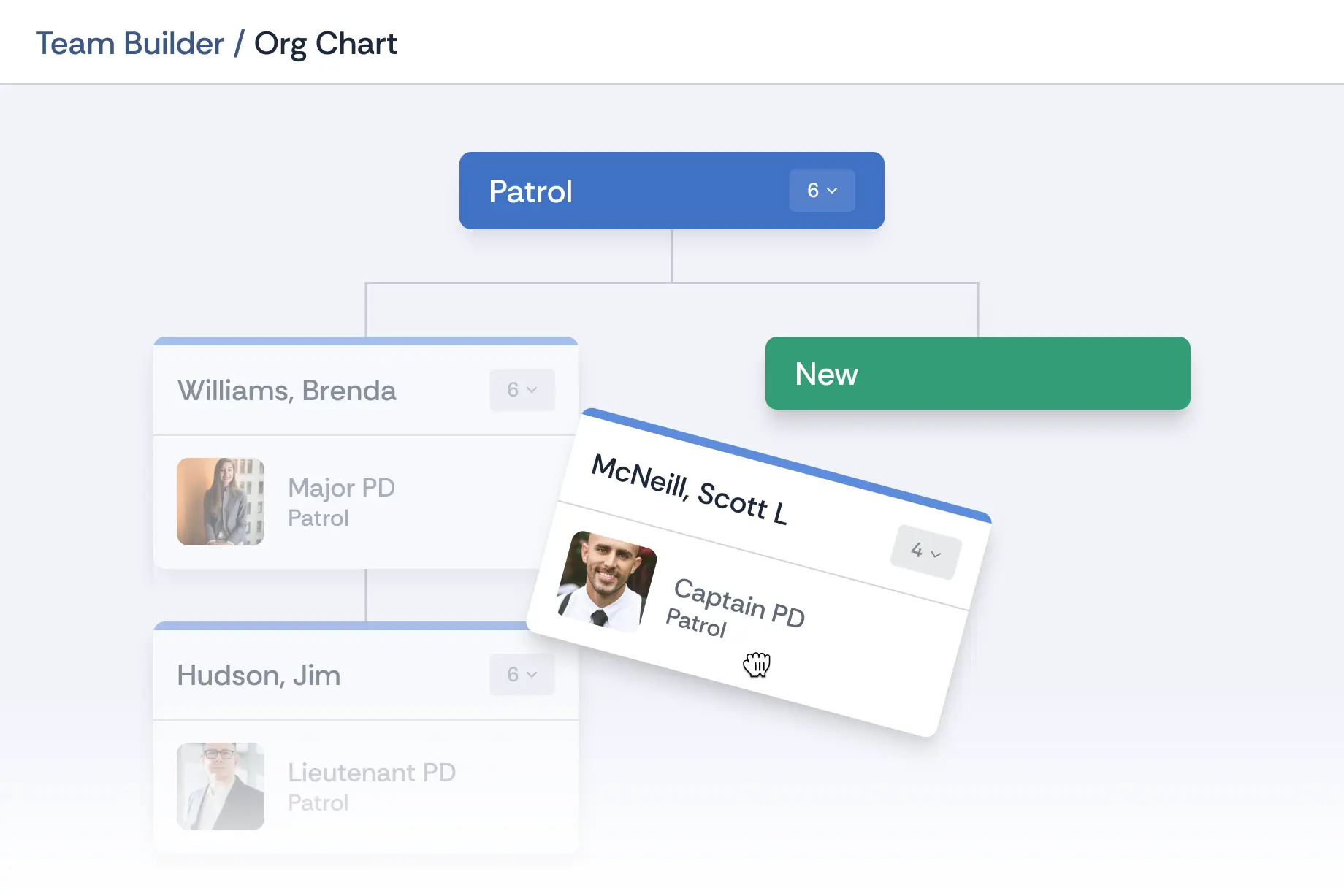
Plenty of vendors do, and the drawing tools are good at it. Lucidchart, SmartDraw, Visio, Organimi and Pingboard all let you drag one box onto another. The useful question is what the drag does. In a diagramming tool, a shape moves. In Essential Personnel, the employee moves, and their record goes with them.
The Town of Southern Pines runs more than 210 employees across police, fire, public works and every other department on one system. When somebody transfers between departments, the drag and drop org chart moves that employee and their records to the new supervisor in a single action. The receiving supervisor gets the evaluations, certifications and notes. Nobody re-keys anything, and there's no second system to update afterwards.
That's worth testing in any demo. Ask what exists on the other side of the drop. If a repositioned rectangle is the answer, you're buying a diagram editor, which is a perfectly reasonable thing to buy as long as you're not expecting it to also be your personnel record.
Position control software, or a roster that knows what is funded
The most valuable thing a city organizational chart can do is show a funded position with nobody in it. That's position control, and it's the number a council asks for, the number a department head argues from, and the number a diagram cannot produce, because a drawing only knows about the people somebody drew.
The Government Finance Officers Association has treated authorized headcount as a budget control rather than an HR detail for decades, and municipal budget documents are built on it. Dedicated position control software exists, and larger cities buy it, but in a town of a few hundred employees it usually turns out that what's needed isn't another system. It's for the existing roster to know which seats are authorized.
Where workforce planning software actually helps a town
Enterprise workforce planning software is built for companies modeling headcount across business units, and it assumes a data layer no municipality maintains. The workforce planning software a town actually needs is narrower: a roster it trusts, with the vacancies showing, the licenses attached and the promotion pipeline visible against it. Buy the enterprise version and you'll spend the first year feeding it data you don't have.
When vacancies show on the structure itself, the conversation changes. A department head stops arguing from a spreadsheet assembled last Thursday and starts pointing at the chart: this division has been short a supervisor since February, here's the overtime cost, and here are the two people within reach of the classification. Position control software that lives apart from the roster can tell you the first fact. Only a chart built on the personnel record tells you all three.
Where generic organizational chart software stops
Generic org chart software is built to draw a picture from a list of names. It has no model for an authorized position, a classification, a bargaining unit, a certification with an expiry date or a date range, so it can't answer the questions a town manager actually has. It draws the organization you described to it, not the one you have.
That isn't a criticism of the products. Organizational chart software has become genuinely good at layout, and for a clean diagram in the annual report a diagramming tool will beat anything built for local government. The trouble starts when the chart has to be right rather than presentable, and in a municipality that moment is usually a council meeting.
What local government hr software has to do that a diagram can't
| The question | Generic org chart software | A chart built on a personnel record |
|---|---|---|
| How many funded positions are open across all departments? | No concept of an authorized position. A vacancy is a box somebody deletes | Vacancies display as vacancies, with the date each seat opened |
| Which staff hold a certification that expires this quarter? | Not tracked. Lives in a separate spreadsheet per department | Filter the roster by certification, qualification or expiry window |
| Who was the reporting supervisor when the grievance was filed? | Shows today's structure only | Assignment history is on the record, so the chart reads as of a date |
| Who's close to being promotable into the building inspector vacancy? | Outside its scope entirely | Career paths pull completion automatically from training and certifications |
| What does the fire department's chart look like inside the city chart? | One reporting line per person, no rank, no shift | Rank, shift and assignment are modeled, so both views come from one roster |
The public safety complication
Police and fire break most municipal hr software, and they break it in the same place: rank moves independently of assignment, the same seat can have three shift occupants, certifications are mandated by state standards and expire, and sworn staff follow different rules for discipline and promotion than everybody else in the building. A city chart that can't represent any of that is a chart with a hole in the middle.
This is why so many towns end up with a citywide HR platform plus whatever the fire chief and the police chief bought separately. Each purchase was sensible. Together they mean the city has no single roster, and the finance director's position count is assembled by asking three people.
The alternative is a platform that handles both: general employees with classifications and departments, and sworn staff with rank, shift, station or division, task books and certifications. Essential Personnel was built for public safety first and used town wide, which is an unusual direction of travel in this category and the reason the fire department view doesn't feel bolted on.
Southern Pines put the shared standard above the departmental differences, and it's a useful way to think about the chart as well.
"Every department, whether it be police, fire or public works, has a specific way of doing things, but no matter what role we have, we all want to deliver exceptional service to our people and those we serve."
Mike Cameron, Fire Chief and Assistant Town Manager, Town of Southern Pines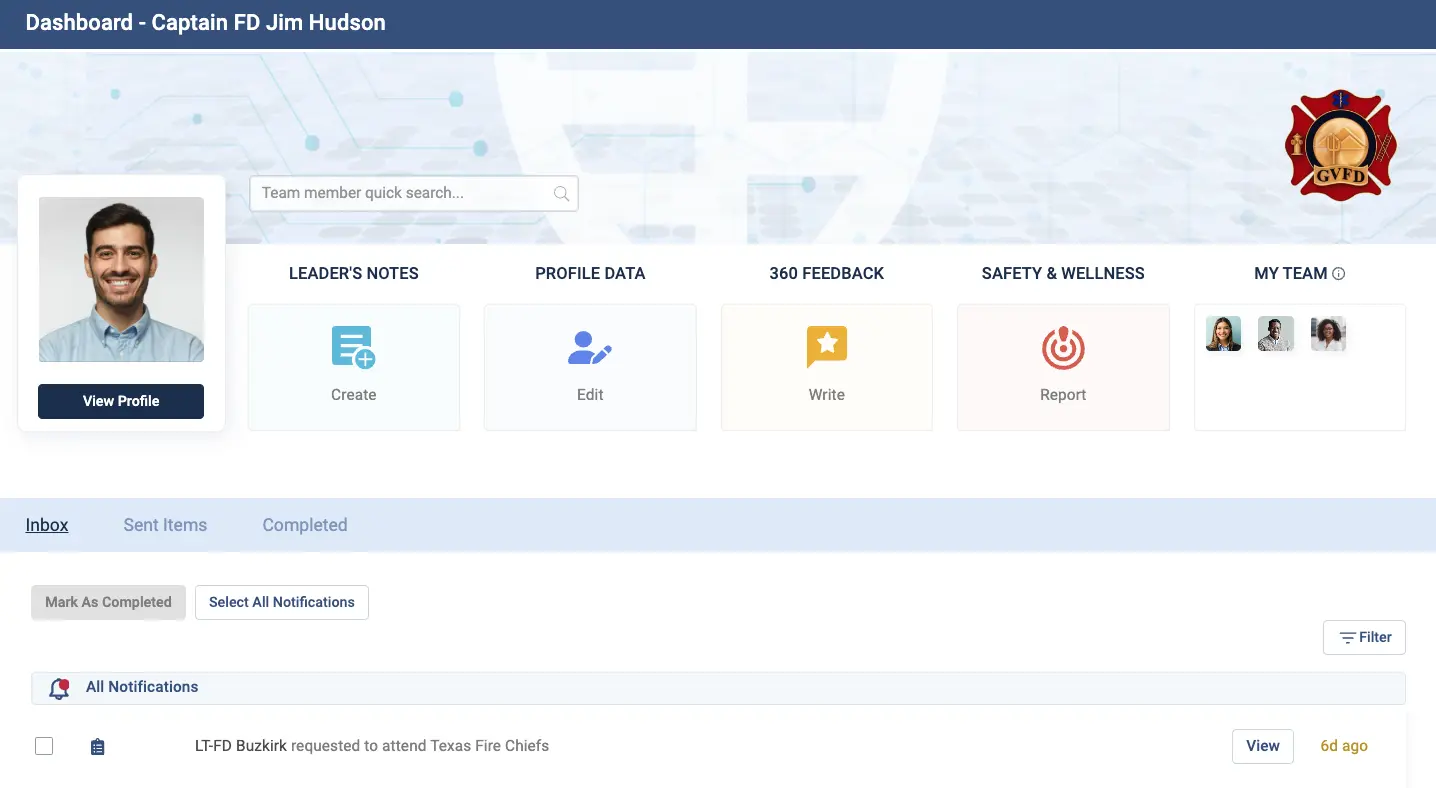
Committees and cross department teams
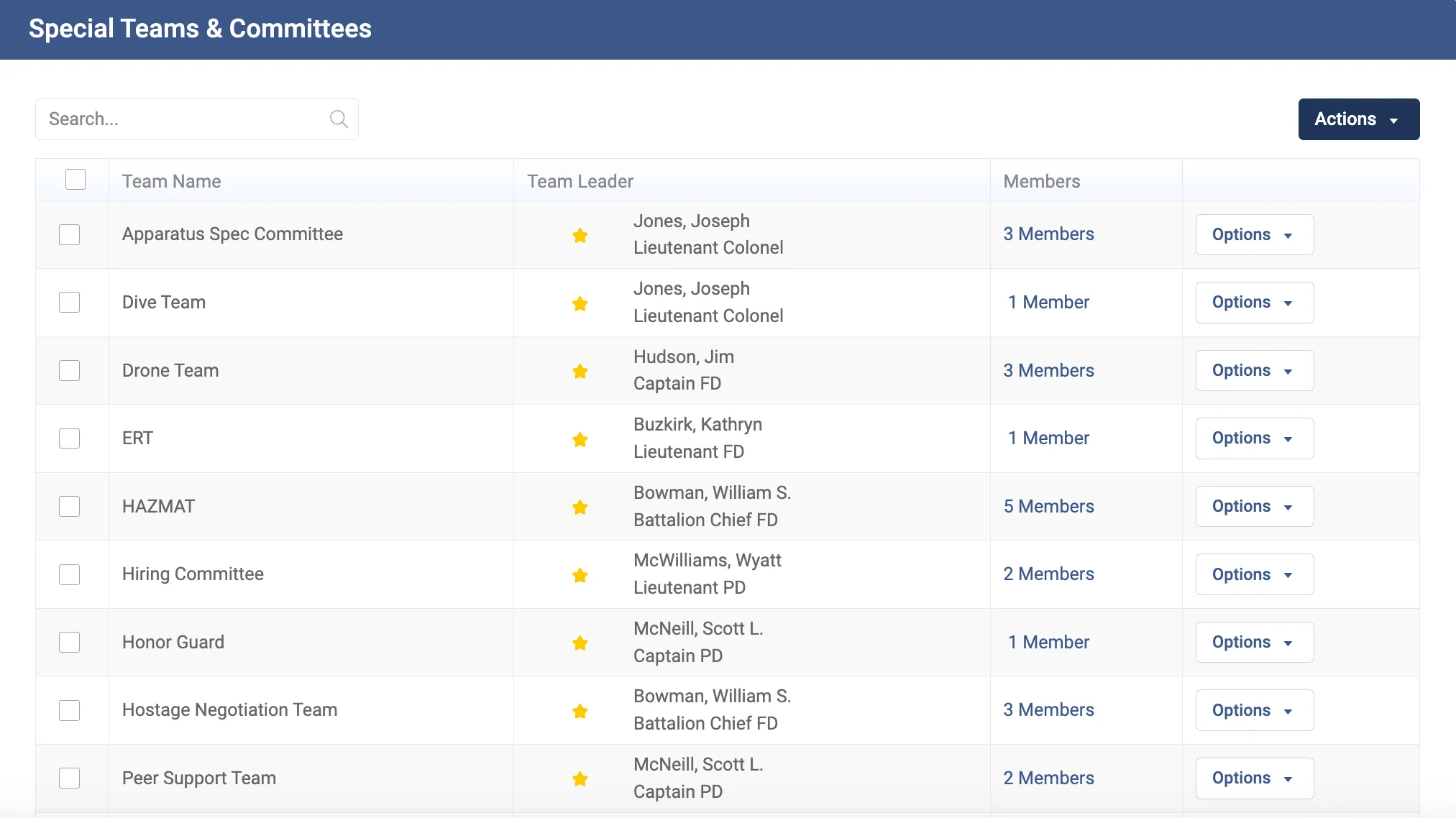
A lot of how a town actually works doesn't appear on the org chart at all. Safety committees, emergency management teams, the standards committee, hiring panels, peer support: each has a leader, a membership and often a qualification requirement, and each cuts across departments. They're the first thing to go stale when the chart lives in a drawing tool.
Essential Personnel handles this as its own layer. Special Teams and Committees supports building custom teams, naming a leader, and tracking membership and assignments on the same roster that draws the chart, so a committee member who transfers between departments doesn't quietly fall off the list.
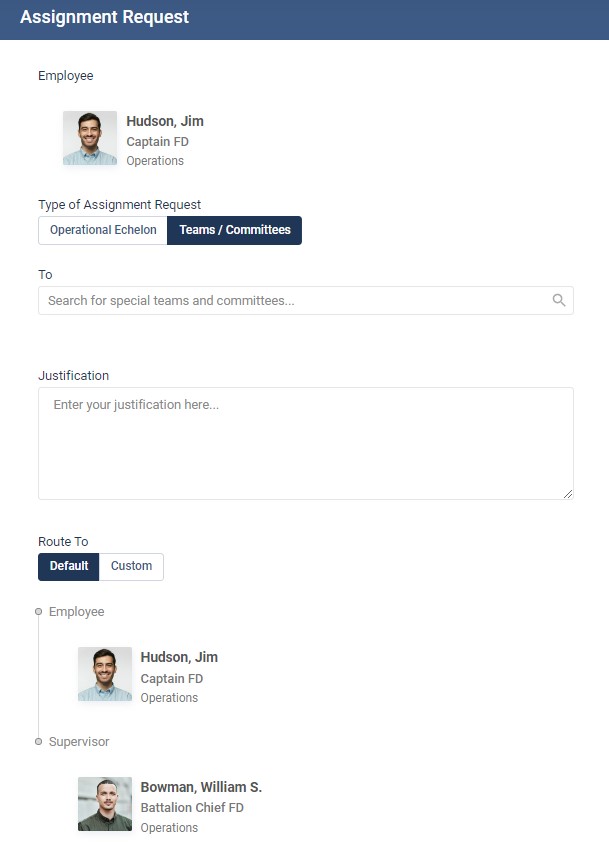
Assignments gives employees a tracked route to request a transfer or a place on a team, with a routing chain and a status, instead of an email to a director who's on leave. In a town where a transfer often means moving between departments rather than within one, that route being visible matters more than it does in a single agency.
Succession planning software across a whole town
Succession planning software in a municipality has a harder job than in a single agency, because the shortages are rarely where you expect. It's the planning director, the building inspector, the water treatment operator with the license nobody else holds. Those roles have small internal pipelines and long external hiring cycles, and the first warning usually arrives as a resignation letter.
This is the problem Southern Pines described directly. They used the system to hold every certification and qualification town wide so they could see who was in reach of which role, and then mentor toward it rather than react to a vacancy.
"We've told everyone to put all their certifications and qualifications into the system, which helps us cultivate the next wave of leaders within our town. For example, there's a shortage of experienced planning directors and building inspectors. EP helps us track all of their certifications and qualifications."
Mike Cameron, Fire Chief and Assistant Town Manager, Town of Southern PinesGood succession planning software works from readiness rather than a named shortlist. Career Paths publishes the requirements for a classification, and completion maps automatically from training and certifications rather than being self reported. Promotion and Retirement Eligibility then sorts the roster so you can see who's eligible now and how many requirements everyone else has left. Good succession planning software answers who could hold this job in eighteen months, not who's next in line.
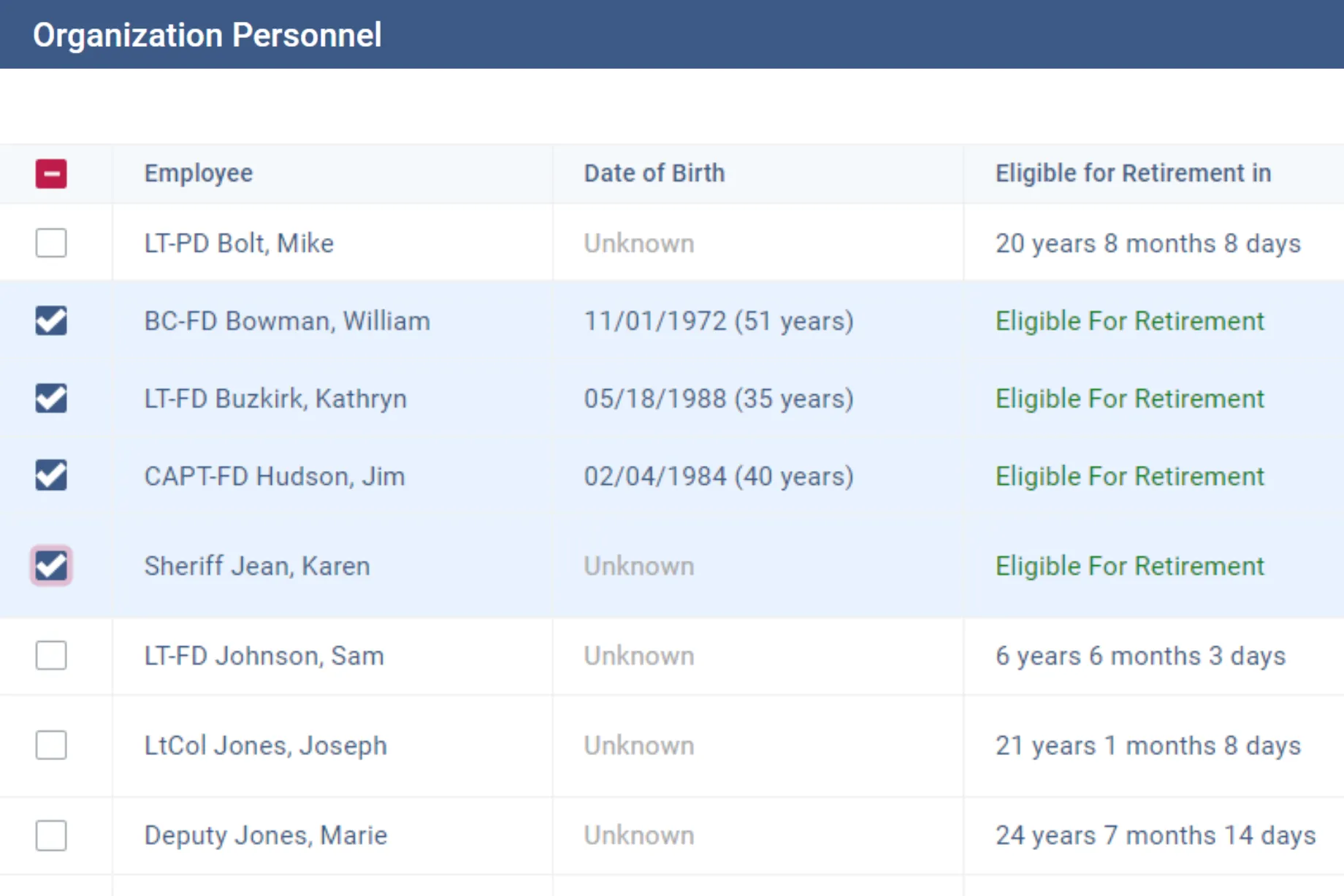
Succession planning software that only records intentions won't surface a gap like that, because nobody writes down the thing they haven't noticed. Succession planning software built on live certification data will. The same data changes the retention conversation. Southern Pines used it to move people rather than lose them, which is the cheapest hiring a town will ever do.
"We've also used EP to help counsel employees whose current position may no longer be the best fit. We've been able to facilitate a move to another town position rather than losing them altogether."
Mike Cameron, Fire Chief and Assistant Town Manager, Town of Southern PinesWhat towns say about running it everywhere
The City of Pinellas Park runs Essential Personnel across departments, and their HR director frames the value in terms of the whole workforce rather than any single tool.
"Our partnership has been immensely valuable to the City and has had a significant impact on the development of all our employees."
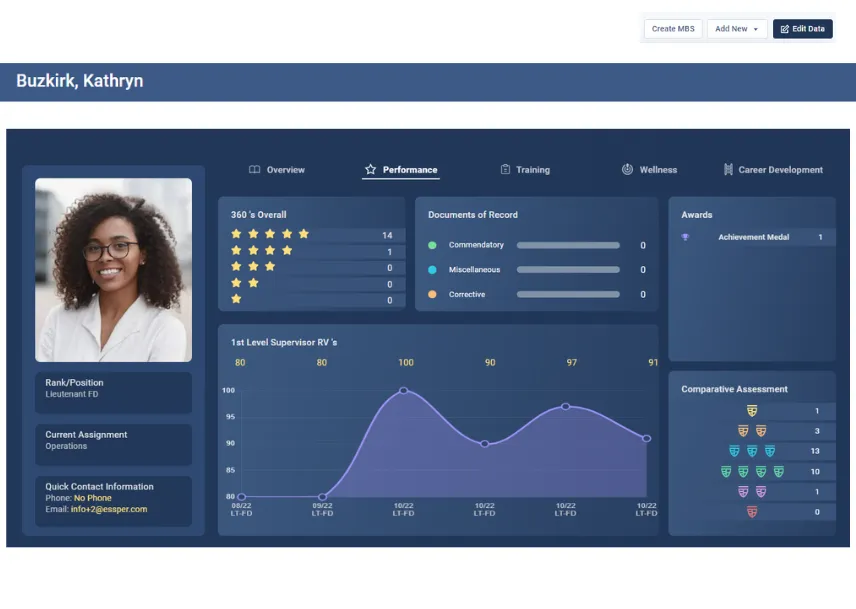
LaSharon Hampton, HR Director, City of Pinellas ParkWhat makes that possible is one roster underneath everything. Once the chart, the certifications, the evaluations and the committees all read from the same record, reporting across departments stops being an exercise in collecting spreadsheets.
Why Essential Personnel answers the whole problem
Essential Personnel was founded in 2020 in Wilmington, North Carolina by two firefighters, and the org chart sits inside a platform that also holds evaluations, training records, certifications, awards, equipment, wellness data and documentation. That's why the chart stays current: nobody maintains it as a separate artifact. It's a view of data that departments are already keeping accurate for their own reasons.
Every partial answer fails the same way. A diagramming tool gives you a picture that decays. Municipal hr software built for general local government gives you a directory that can't model rank, shift or task books, so public safety buys around it and the town is back to two rosters. Four point tools give you four partial copies of the roster, and the reconciliation is invisible work that never shows up in a price comparison.
One record, every department
Employee Profiles hold personal details, credentials, performance, career history, wellness data, training records and awards. Police, fire and general government all sit in it.
Public safety is native
Rank, shift, station, division, sworn and civilian status are modeled rather than typed into a label, so the fire and police views aren't an afterthought.
Published pricing
The bundled Total Solution is $175 per user per year with a $3,000 one time startup, and individual suites run $20 to $85 per user. Size based discounts apply.
Procurement you already have
Available on GSA Advantage, NASPO, Omnia Partners, NCSA and VSA, so a purchase can ride an existing contract vehicle.
Local government hr software is also bought differently from corporate software, and IPMA-HR has made the point for years that public employment is structurally different enough that corporate tools don't transfer cleanly. Cities buying for police and fire alongside general government should also read the hosting position rather than take it on trust. Essential Personnel hosts on AWS GovCloud, is CJIS aligned, audited to SOC 2 Type II annually, and uses FIPS 140-3 validated cryptography with multi factor authentication at AAL2. The security and compliance page has the detail, and ICMA and the National League of Cities both publish useful background on how local governments should approach vendor security review.
The human resources overview covers the general government side, law enforcement and fire and EMS cover the sworn side, and pricing is published rather than quoted on request, which is worth checking against whoever else is on your list.
Questions to ask before you buy municipal hr software
Take this list to every demo
- Show me a vacancy on the chart. Not a deleted box, a funded position with nobody in it.
- Move somebody from public works to parks while I watch. What follows them?
- Show me the organization as it stood on a date at the last budget adoption.
- How do you model a fire captain's rank separately from their assignment?
- Can one position carry three shift occupants without the chart becoming unreadable?
- Filter everyone whose license or certification expires this quarter, across all departments.
- Can a department head see their own people without seeing the whole city?
- Where do cross department committees live?
- Show me who's within two requirements of a classification we're struggling to fill.
- Is the price published, and what's the five year total including startup?
A vendor who answers the first four convincingly is selling local government hr software that understands public safety. A vendor who answers them by exporting to a spreadsheet is selling a drawing tool, and the gap will show up at the next budget adoption rather than in the demo.
If you want to see how the options score against each other, the personnel record and org chart systems comparison ranks five of them, and the government performance management guide and citywide training compliance guide cover the adjacent categories most towns buy at the same time.
Frequently asked questions
Municipal org chart software displays a city or town's reporting structure, but unlike general organizational chart software it draws that structure from a live personnel record. It is usually bought as part of municipal hr software rather than on its own. That lets it show authorized positions as well as filled ones, carry classifications and bargaining units, model rank and shift for police and fire, hold assignment history so the chart can be read as of a past date, and be filtered by certification. The distinction that matters is whether the chart is a picture somebody maintains or a view of data departments are already keeping current.
Yes. Essential Personnel's Team Builder is a drag and drop org chart with team creation and vacancy management, real time updates, search and filter, and role based access. Because it sits on the same roster as the rest of the platform, dragging an employee to a new supervisor transfers that person and their records rather than just moving a shape, which is how a transfer between departments gets handled in one action. Diagramming tools such as Lucidchart, SmartDraw, Visio and Organimi also offer drag and drop, but what moves is a box on a canvas.
Yes, provided it models rank and shift natively rather than treating sworn staff as ordinary employees with unusual job titles. Essential Personnel holds certifications with expirations and source documents, task books and qualifications, logbook hours, and training events with attendance and cost, and the same record serves general government staff with classifications and licenses. That single roster is what lets a finance director produce one position count instead of asking three departments. It is not a course library, so departments run it alongside whichever training provider they already use.
Larger cities often do, because their position control software has to tie directly into a multi fund budget model, and that is a finance requirement rather than a workforce planning software requirement. For a town of a few hundred employees the requirement is usually simpler: the roster needs to know which seats are authorized, so a vacancy shows on the chart with the date it opened. Once that's true, the position count in the budget book and the one in HR stop disagreeing, which is most of the value that dedicated position control software is bought for in the first place.
Corporate systems assume a manager can promote whoever they choose and that one person holds one job under one supervisor. Government employment is structurally different: promotions are often governed by policy or statute and reviewable by a board or a union, classifications and bargaining units matter, and public safety adds rank, shift and state mandated certifications on top. Municipal hr software has to produce the evidence behind a decision rather than just record it, which is the requirement corporate suites were never designed for.
Through a separate layer rather than as another branch of the reporting tree. Special Teams and Committees supports creating custom teams, naming a leader, and tracking membership and assignments on the same roster that draws the org chart. That suits safety committees, emergency management teams, hiring panels and peer support, all of which cut across departments and would otherwise live in somebody's spreadsheet. Assignments then gives employees a tracked route to request a transfer or a place on a team.
Essential Personnel publishes pricing, which is unusual in this category. The bundled Total Solution is $175 per user per year, individual suites run between $20 and $85 per user, and there's a one time startup fee of $3,000. Single sign on is an optional $800 per year per agency, and size based discounts apply. Purchases can ride GSA Advantage, NASPO, Omnia Partners, NCSA and VSA. Most local government hr software quotes on request, so a published number is a useful benchmark when you compare.
For most towns, yes. Dedicated workforce planning software is generally built for large enterprises modeling headcount scenarios and assumes a data layer a municipality doesn't maintain. The planning questions a town actually needs answered are narrower: where the vacancies are, who's eligible for promotion, which licenses lapse this year, and who's within retirement range. Those are queries against a live roster. What it isn't is a multi year budget forecast model tied to finance, so if you need that you'll want a dedicated tool alongside it, fed by this roster.
See it across your own departments
Walk through the chart, the roster and the committees with someone who's worked in local government. Call (910) 390-0011 or email info@essper.com.
About this article
Written by Scott Monroe, Chief Executive Officer & Co-Founder, Essential Personnel. Published 23 September 2026.
Essential Personnel makes the software described here, and the product screenshots are from the platform. Pricing, hosting and procurement details are taken from the published pricing and security pages. Customer quotes are reproduced from published customer stories with the speaker's name and title as given.
