
What questions should a fire chief ask when choosing personnel software? 36 questions to ask every vendor
Choosing fire department software is harder than it looks, because the word covers four different products. Records management handles incidents and reporting, scheduling handles shifts and staffing, a learning management system delivers courses, and personnel software holds the record of each member: certifications, task books, training hours, evaluations, exposures, equipment and policy acknowledgements. Most bad purchases start with a demo of one of those answering a question meant for another.
This guide is for fire chiefs, training officers and administrative chiefs choosing fire department personnel software. It sets out what to settle before you call a vendor, 36 questions to ask in every demo, a demo script that uses your own data, the red flags, and a scoring sheet you can adapt. It also shows how Essential Personnel answers each question, including the ones where the honest answer is no.
The short answer: the questions a fire chief should ask when choosing personnel software
Before any demo, decide which problem you're solving and which reports you must produce: ISO, accreditation, state certification and exposure history. Then ask every vendor to show, live and with your data, a list of everyone whose certification lapses in the next 90 days, a member's task book, a year of training hours by ISO category, and a member's full exposure history.
After that, ask how they integrate with your records management, scheduling and course systems, where the data is hosted, what happens to your records if you leave, and what the full price is per user, including startup and single sign on. Essential Personnel publishes all of that on its pricing and security pages, which lets a chief compare quote only vendors against a known number.
The rest of this guide turns that into a list of questions to ask in a demo. The questions are grouped so you can hand each section to the person who owns it: the training officer, the shift commander, the safety officer, IT and purchasing.
First, decide which kind of fire department software you need: RMS, scheduling software, LMS or personnel software
Fire department software, including anything sold as fire department management software, falls into four categories: records management for incidents, scheduling and staffing, learning management for course delivery, and personnel software for the member record. Many products cover more than one, but very few do all four well. Decide which category your problem sits in before you compare vendors.
| Category | What it's for | The question it answers |
|---|---|---|
| Fire department records management system (RMS) | Incident reports, inspections, preplans, occupancy records and federal incident reporting | What happened on that call, and is it reported? |
| Fire department scheduling software | Shift rotations, minimum staffing, callbacks, overtime and time off | Who is working, and are we staffed? |
| Learning management system (LMS) | Online courses, video, quizzes and course completion | Did the member finish the course? |
| Personnel and professional standards software | Certifications, task books, training hours, evaluations, exposures, incidents, equipment and policy acknowledgement | Who is current, who is qualified, and can we prove it? |
The fourth category is the one this guide is about, and it's the one most often left to spreadsheets. Products sold as all in one fire department management software usually start from one of the first three and add a training tab. A department can run a strong records management system, good scheduling software and a course library and still have a training officer rebuilding certification dates by hand every month. The ranked comparison of training systems covers how the LMS and the system of record fit together.
Questions a fire chief should settle before calling a vendor
Before a fire chief asks a vendor anything, settle five things inside the department: the problem you're solving, who owns the system, which reports it must produce, what it has to connect to, and how you'll buy it. A vendor can't answer these for you, and a demo run without them turns into a tour of features you didn't ask for.
- What problem are we solving? Write it as one sentence a member would recognize: "We can't tell who is current on EMT without opening three spreadsheets" is a requirement; "we need better software" isn't.
- Who will own it? Name the administrator, usually the training officer or a chief of administration, and the company officers who will enter records. If company officers won't use it, the records stay on paper.
- Which reports must it produce? List them: ISO training hours, Center for Public Safety Excellence accreditation evidence, state certification renewals, exposure history, annual evaluations, and anything your city or county asks for.
- What does it have to connect to? List the records management system, any fire department management software you already own, scheduling system, course provider, payroll and HR system you'll keep, and what you expect to flow between them.
- How will we buy it? Know your budget year, your purchasing threshold, and whether you can buy through a cooperative contract such as GSA Advantage or NASPO ValuePoint without a full bid.
Questions about training and certification records
Ask how the software tracks certifications and their expirations, task books, training hours, training events and the source documents behind them, and ask to see each one in a report. If annual ISO or accreditation reporting doesn't fall out of the records your members enter every day, the software isn't doing its main job.
- Show me everyone whose certification lapses in the next 90 days. It's the question a training officer asks most, and it separates fire department software that holds records from software that only stores them.
- How do you track task books? Ask to see a half finished task book for a member who moved stations, with who signed each item and when.
- Can we log training hours against our own categories and ISO's? The ISO Public Protection Classification program reviews company, officer, driver and hazmat training records, so the hours have to be sortable that way.
- Where does the certificate live? The source document should be attached to the record, not filed in a shared drive.
- Can a member hold state, national and agency credentials at once, each on its own cycle? EMS licensure, national registry and agency authorizations rarely renew together.
- Can we filter the roster by qualification? A special operations chief doesn't need the team list; they need who currently holds the qualifications the team needs.
- Who entered each record, when, and what changed? Ask to see the audit log for one training entry. A record nobody can vouch for is a weak record in an ISO review, an accreditation site visit or a grievance.
The stakes are concrete. Verisk, which runs ISO's grading, says on its training criteria page: "When no records exist for training, there will be no credit for items A through H in Section 570 of the FSRS." NFPA 1401, the recommended practice for fire service training reports and records, is current in a 2026 edition, so ask the vendor how their records map to it.
Questions about performance and professional standards
Ask how the software records evaluations, coaching, counseling, commendations and discipline, how it handles probationary firefighters, and whether ratings from different officers can be compared. These records end up in promotion decisions and discipline appeals, so ask how each entry is dated, approved and kept.
- Can we build our own evaluation forms? Firefighters, engineers, company officers and staff roles need different criteria.
- How do you handle officers who rate hard or easy? Without some correction, a promotion board can't compare scores from different shifts.
- How do recruit and probationary evaluations work? Ask for structured daily observation reports rather than free text, rolled up across a whole academy class.
- How are commendations and corrective documents routed and approved? Ask who can see a document of record, who approves it, and whether the approval is recorded.
- Does it show promotion and retirement eligibility? Ask to filter for everyone eligible for lieutenant now and how many requirements everyone else has left.
Questions about exposures, incidents and wellness
Ask whether exposures, injuries, apparatus accidents and critical incidents are recorded against the member, so they build up across a whole career, and how the software flags members who have had too many traumatic calls. Presumptive cancer claims can turn on exposure history logged decades earlier, so ask how long records are kept.
- Are exposures recorded against the member, not only the incident? An exposure filed only in the incident report is hard to find twenty years later.
- How do you flag repeated critical incidents? Ask what the threshold is, who sets it, and who gets the alert.
- Who can see wellness records? Ask how peer support and behavioral health information is kept apart from evaluations and discipline.
- Is an apparatus accident recorded against the driver as well as the truck? It's a vehicle event, a possible injury and a training question at once.
Our guides to critical incidents and apparatus accidents cover what those records should contain.
Questions about policies and SOGs
Ask how the software publishes policies and standard operating guidelines, keeps old versions, and proves each member received the current one. The common failure in fire is two versions of an SOG in circulation and no way to show which one a crew had read.
- How do you handle versions? Ask to see a revised SOG with the prior version still in the history.
- How do members acknowledge a policy, and can I see who hasn't? Acknowledgement proves receipt, so ask what else the vendor claims it proves.
- Are new hires assigned the policies they need automatically?
If you mean scheduling software: questions about staffing, overtime and payroll
Many chiefs asking about personnel software mean fire department scheduling software: shifts, minimum staffing, overtime, trades and payroll. Ask how it handles your work period and overtime rules, whether it stops a member with a lapsed certification from filling a seat, how trades and callbacks are logged, and what it sends to payroll.
- How do you handle our work period and overtime rules? Fire departments often use a work period under section 7(k) of the Fair Labor Standards Act and a labor contract on top of it, so ask to see both configured.
- Does a lapsed certification stop someone filling a seat? Minimum staffing by qualification, such as a certified driver or a paramedic on every unit, only works if the schedule reads current certifications.
- How are trades, callbacks and overtime offers recorded? Ask for the audit trail, since these are the records that end up in grievances.
- What goes to payroll, and in what format? Ask to see an export your finance office could load without retyping.
Scheduling and the member record are different jobs, and they're usually different products. The schedule needs to know who is qualified today; the member record is where that qualification is proved. Ask how the two connect before you buy either.
Questions to ask about integrations with your records management system and scheduling software
For every system you'll keep, including your records management system and scheduling software, ask exactly what data moves, in which direction, how often, and who maintains the connection. Get the answers in writing. "We integrate with that" can mean anything from a live sync to a spreadsheet import, and the gap between what a buyer assumed and what was delivered usually sits here.
- What moves between your system and our RMS? Since the NFIRS sunset, federal incident reporting runs through NERIS, so confirm your RMS handles that and ask what incident data, such as exposures, reaches the member record.
- Do you do scheduling, or connect to ours? Most fire department scheduling software is a separate product. Ask which scheduling software the vendor connects to and whether staffing data, such as who rode which seat, reaches the member record.
- Can our course provider's completions reach the training record? Ask what format the provider exports and how often.
- Is there an API or a bulk export for systems not on your list?
Questions about security and your data
Ask where the data is hosted, whether it stays in the United States, how it's encrypted, whether there's an independent audit report such as SOC 2 Type II, how sign in works, and what happens to your records, in what format and how fast, if you leave. Have your IT department or city security officer ask these, not the training officer.
- Where is the data hosted, and is it in the United States?
- Which security framework do you follow? Ask whether controls are built on NIST SP 800-53 or mapped to the NIST Cybersecurity Framework, which many city IT departments use. CJIS matters only if the system will hold criminal justice information, such as records shared with police.
- Can we see your SOC 2 Type II report? A SOC 2 Type II report is an independent auditor's view of how controls worked over a period, not a one day snapshot.
- Do you support single sign on and multi-factor authentication, and what does single sign on cost?
- If we leave, what do we get back, in what format, and how fast? Ask for the answer in the contract.
Questions about cost and the contract
The cost questions to ask are the ones vendors answer least willingly. Ask for the full annual price per user, every one time fee, what counts as a user, how volunteers and part timers are priced, the contract term, what happens at renewal, and which cooperative contracts the vendor holds. Compare the five year cost, not the first year quote.
- What's the full price for our headcount? Include startup, single sign on, extra modules and any per report or storage fees.
- How do you price volunteers and paid on call members? A large volunteer roster changes the arithmetic, so run your real headcount.
- Is the rate fixed for the term, and what notice do we need to leave?
Questions about implementation and support
Ask who does the setup, how existing records come in, how long it takes, who trains your company officers, and who you call when something breaks. The work that decides whether fire department software gets used is configuration: certification types, task books, evaluation forms, permissions and alert thresholds.
- Who configures it, how do our spreadsheets come in, and who do we call afterward? Ask for the name of the person, not just the support email, and talk to a department your size that went live in the last year.
A fire department software demo script: make the vendor use your own data
Send each vendor the same small sample of your own records a week before the demo and ask them to load it: ten members, their certifications, one task book, a month of training hours and one exposure. Then ask each vendor to perform the same tasks live, in the same order, while you score them.
| Ask them to | What a good answer looks like |
|---|---|
| List everyone whose certification lapses in 90 days | One saved report, run in seconds, with the source certificates attached |
| Sign off an item in a member's task book | Done from the company officer's view, dated and attributed, visible to the training officer at once |
| Show a year of training hours by ISO category | A report you could hand to an ISO field representative without retyping |
| Log an exposure and find it again on the member | Recorded once and visible on the member's profile for their whole career |
| Publish a revised SOG and show who hasn't read it | New version issued, old one kept in the history, a list of who hasn't acknowledged |
| Filter for everyone qualified as an engineer | A live roster filtered by current certification and qualification |
| Export everything for one member | A complete record in a format you can open without the vendor |
Bring the training officer and one company officer to every demo, and have the fire chief sit in on the last one. The training officer will spot a weak report; the company officer will tell you whether the entry screens are something they'll use at the end of a 24 hour shift.
Red flags in fire department management software demos
Whether the product is sold as fire department management software or personnel software, be wary of a vendor who won't load your data before the demo, can't produce the 90 day lapse report live, describes an integration without saying what moves, won't publish or put a full price in writing, or can't say how you get your records back if you leave.
| What you hear | What to ask next |
|---|---|
| "We integrate with everyone" | Which fields, which direction, how often, and who fixes it when it breaks? |
| "That report is on our roadmap" | Is it in the contract, with a date? |
| "Pricing depends on your needs" | What is the per user price for our headcount, in writing, for five years? |
| "You can export anything" | Show me one member's full record exported now |
| "Our LMS tracks certifications too" | Show me state, national and agency credentials with separate expirations for one member |
| "It's CJIS certified" | CJIS has no certification; ask how they align with the FBI's CJIS Security Policy and for their audit report |
A scoring sheet for fire department personnel software
Score every vendor of fire department personnel software on the same criteria, weighted to your department's priorities, straight after each demo. A simple sheet with seven weighted criteria and a one to five score keeps the decision about the work your members do rather than the most polished presentation.
| Criterion | Suggested weight | What scores a five |
|---|---|---|
| Training and certification records | 25% | 90 day lapse report, task books and ISO hours shown live with your data |
| Performance and professional standards | 15% | Custom evaluations, comparable ratings, probation tracking, routed documents |
| Exposures, incidents and wellness | 15% | Career long exposure history on the member, with critical incident alerts |
| Integrations | 10% | Named connections to your records management system, scheduling software and course provider, described in writing |
| Security and data | 10% | US hosting, SOC 2 Type II report, single sign on, a written exit and export clause |
| Cost and purchasing | 15% | Published or written per user price, five year cost known, cooperative contract available |
| Ease of use and support | 10% | Company officers can enter a record unaided; a named implementation contact |
Change the weights to suit you, and let the fire chief sign off on them. A department preparing for accreditation might put 35% on records; one that has just lost a presumptive cancer claim might double the weight on exposures. What matters is agreeing the weights before the first demo, not after the one you liked.
How Essential Personnel answers these questions
Essential Personnel is fire department personnel software, and professional standards software for police and municipal HR, built by two firefighters. It holds each member's certifications, task books, training hours, evaluations, exposures, incidents, equipment and policy acknowledgements on one record. It isn't a records management system, a scheduling system or a course library, and it connects to those rather than replacing them.
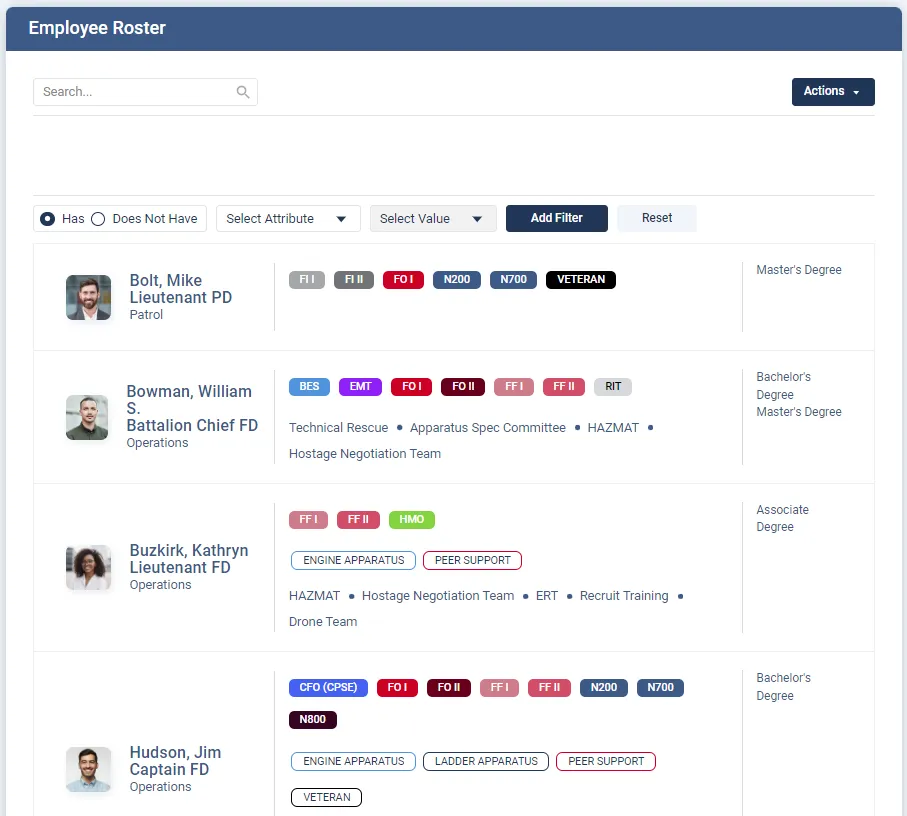
Here's how Essential Personnel answers the questions to ask above, taken from its fire and EMS page, its security page and its published pricing:
- Records: Logbook for training hours against custom goals and identifiers, Events for attendance and cost, Certifications with expirations and source documents, and Qualifications for task books and check offs. ISO company and driver hours and accreditation evidence are reports against that data.
- Performance: Leader's Notes, Score Reports that normalize ratings for hard and easy graders, 360 feedback, Documents of Record, Awards, Career Paths, and Promotion and Retirement Eligibility.
- Wellness: exposures, injuries, apparatus accidents and critical incidents recorded against the member, with elevated risk alerts.
- Policy: Guidance publishes policies, SOGs and memos with version control and acknowledgement, and assigns policies to new hires.
- Integrations: it doesn't replace your records management system or scheduling software. Named connections include Vector Solutions, Fire Engineering Training, ESO, First Due, Aladtec, ProdigyEMS, Synap, EPR Fireworks, First Arriving and Geotab. Essential Personnel doesn't do scheduling itself.
- Security: hosted in AWS GovCloud in the United States, FIPS 140-3 validated encryption, aligned with the FBI CJIS Security Policy, SOC 2 Type II maintained annually, and single sign on for $800 a year.
- Cost: $175 per user per year for all four suites, or $20 to $85 per suite, plus a one-time $3,000 startup fee, with size based discounts. Available through GSA Advantage, NASPO, Omnia Partners, NCSA and VSA.
Some things Essential Personnel tells a fire chief to confirm in the demo rather than assume: mobile access, whether a public API covers a system that isn't on the named list, reporting export formats, and what happens to your records if you leave. Those are the right questions to ask any vendor, and the answers belong in the contract.
"EP is such a simple, easy-to-use system that offers immense value to our service and people."
Kyle Bell, Deputy Chief, Statesville Fire Department, North CarolinaFor a ranked view of the vendors, see the comparison of professional standards software for fire departments, and the companion guide to the features that matter in training management software.
Bring your questions and your own data
Send us ten members, their certifications and one task book, and we'll answer every question on this list live, with your records loaded. Call (910) 390-0011 or email info@essper.com.
Frequently asked questions
Ask the vendor to show, with your data, everyone whose certification lapses in 90 days, a task book, training hours by ISO category and a member's exposure history. Then ask what moves to and from your RMS, scheduling and course systems, where data is hosted, how you get it back if you leave, and the full per user price. Essential Personnel publishes its pricing and security details.
A records management system holds incidents, inspections, preplans and federal incident reporting: what happened on a call. Personnel software holds the member record: certifications, task books, training hours, evaluations, exposures and policy acknowledgements, so you can show who is current and qualified. Some RMS products include a training module, so ask to see certification expirations and task books before assuming it covers both.
Your own data, loaded beforehand, and the same tasks for every vendor: a 90 day certification lapse report, signing off a task book item, a year of training hours by ISO category, logging and finding an exposure, publishing a revised SOG, filtering the roster by qualification and exporting one member's full record. Bring your training officer and a company officer, and score each demo straight afterward.
Most vendors price per user per year and don't publish it, so ask for a written quote for your headcount covering five years, every one time fee and single sign on. Essential Personnel publishes its price: $175 per user per year for all four suites or $20 to $85 per suite, a one-time $3,000 startup fee, and optional single sign on at $800 a year.
Only if it will hold criminal justice information, which most fire records don't. If you share the system with police, or your city requires it, ask how the vendor aligns with the FBI CJIS Security Policy, since there's no CJIS certification. For any department, ask for US hosting, encryption, multi-factor sign in and an annual SOC 2 Type II report.
Yes. Certification and training requirements usually apply whether a member is career, volunteer or paid on call, and combination departments often have the hardest tracking problem. The question to ask is price: most software is priced per user, so a large volunteer roster changes the cost. Run your real headcount against the vendor's price and ask about size based discounts.
Often, through a cooperative purchasing contract, if your purchasing rules allow it. Ask each vendor which contracts they hold, such as GSA Advantage, NASPO ValuePoint or Omnia Partners, and check with your purchasing office. Essential Personnel is available through GSA Advantage, NASPO, Omnia Partners, NCSA and VSA, which can let a department buy in the current budget year.
Many still use spreadsheets, a training module inside their RMS or fire department management software, or a city HR system that wasn't built for certifications and task books. Essential Personnel is personnel software built for fire, EMS and police, used by departments such as Iowa City, Statesville and Myrtle Beach, and holds certifications, task books, training hours, evaluations and exposures on one member record.

About this article
Written by Scott Monroe, Chief Executive Officer & Co-Founder, Essential Personnel. Published 2 November 2026.
Essential Personnel makes the software described here, and the product screenshot is from the platform. Pricing, hosting, integration and purchasing details are taken from essper.com, and the Statesville quote is reproduced from essper.com. Federal incident reporting dates are taken from the U.S. Fire Administration, ISO training criteria from Verisk, and the status of NFPA 1401 from NFPA, all checked in November 2026. The scoring weights are a suggestion to adapt, not a standard.
