
What features matter most in fire department training management software? The 12 that matter, in order
Every fire department training software page lists features, and most lists look the same: course library, calendar, reports, mobile app. The features that decide whether the system is any use are less visible. Can it tell you who loses a certification next month? Does one drill count toward company, driver and ISO hours at once? Will the training records hold up when an ISO field representative, an accreditation team or an attorney asks to see them?
This guide is for training officers and fire chiefs choosing fire department training management software. It ranks the 12 features that matter most, explains what each one has to do, shows how they line up with NFPA 1401, NFPA 1010 and 1020, ISO's training credit and CPSE accreditation, and ends with a checklist to test in any demo. Where Essential Personnel handles a feature, and where it doesn't, the guide says so.
The short answer: the features that matter most in fire department training management software
The features that matter most are certification tracking with expiration alerts, training records you log once and count toward every requirement, ISO training reports by category, task books signed off against NFPA job performance requirements, and records that hold up, with source documents and an audit trail. Then come training events, accreditation reporting, probation tracking, a qualified roster, integrations, mobile entry and data export.
Essential Personnel covers the record side of that list: Certifications with expirations and source documents, a Logbook where one session can carry several identifiers, Qualifications for task books, Events, and roster filters by certification. It isn't a course library, so departments keep their online training provider and feed completions into it.
A course library, quizzes and video matter too, but they're features of a learning management system, and most departments already have one. The features below are the ones that decide whether your training records are complete, current and defensible.
Training management system vs an LMS vs an RMS training module
A training management system is the system of record for training: hours, certifications, task books, events and the reports built from them. A learning management system delivers online courses and tracks their completion. A good training management system holds every type of training, not only online courses. Many fire records management systems include a training module, usually built around logging drills rather than certifications and task books.
| Type | Strongest at | Usually weakest at |
|---|---|---|
| Training management software | Certifications, expirations, task books, hours by category, ISO and accreditation reports | Delivering online courses |
| Learning management system (LMS) | Online courses, video, quizzes, course completion and continuing education content | Outside certifications, hands-on drills, task books signed on the drill ground |
| RMS training module | Logging company drills next to incident data | Several credentials per member on separate cycles, task books, tagging one session to several requirements |
Becki White's Executive Fire Officer paper for the U.S. Fire Administration, on selecting a training management system for the Eden Prairie Fire Department in Minnesota, shows why the difference matters. Its shared records system let a training entry carry only one tag, so one session couldn't count toward both a weekly drill and a promotional program, and most departments it surveyed kept certificates as scans or in file cabinets. The ranked comparison of fire training software covers how the two kinds of system fit together.
The 12 features of fire department training management software, ranked
Rank the features of fire department training management software by what fails first without them. A missed recertification takes a member off a seat; missing records cost ISO credit; an unsigned task book stalls a promotion. Features that make entry easier matter, but only after the records themselves are complete and defensible.
| Rank | Feature | What goes wrong without it | Priority |
|---|---|---|---|
| 1 | Certification tracking with expiration alerts | Members lapse without anyone noticing | Must have |
| 2 | Log once, count toward every requirement | Hours are entered twice or credited once | Must have |
| 3 | ISO training reports by category | Weeks rebuilding hours before an ISO review | Must have |
| 4 | Task books and skills sign-off | Qualifications stall on paper | Must have |
| 5 | Records that hold up | No credit, no defense in a grievance or lawsuit | Must have |
| 6 | Training events, attendance and cost | No one knows who attended or what it cost | Should have |
| 7 | Accreditation and state certification reports | Evidence assembled by hand every cycle | Should have |
| 8 | Recruit and probationary tracking | Probation outcomes depend on which officer rated them | Should have |
| 9 | A roster filtered by qualification | No quick answer to who can fill a seat or a team | Should have |
| 10 | Integrations with courses, RMS and scheduling | Completions retyped from other systems | Should have |
| 11 | Mobile entry at the drill ground | Training logged days later, or not at all | Nice to have |
| 12 | Access control, security and data export | Records exposed, or trapped with one vendor | Must check |
1. Certification tracking with expiration alerts and source documents
Certification tracking is the feature that matters most. Fire department training management software should hold every credential a member has, state, national and agency, each with its own expiration date and cycle, warn you before it lapses, and keep the certificate attached to the record. The test: ask for everyone whose certification lapses in the next 90 days.
A firefighter who is also a paramedic may hold state licensure, a national registry credential and agency specific authorizations, each renewing on a different date. Spreadsheet certification tracking breaks at exactly that point, and it's where fire department training software earns its cost first, and an expired credential is usually discovered when someone needs the member on a unit. Look for alerts to the member and the training officer, a report filtered by date range, and the source document stored with the record rather than in a shared drive.
2. Training records you log once and count toward every requirement
One training session often counts toward several requirements at once: company training, driver training, ISO hours, a specialty certification and continuing education. Good training management software lets you log the session once and tag it to every requirement it meets, so hours are never entered twice or credited once.
This is the feature the Eden Prairie paper found missing, and it's easy to miss in a demo because a vendor will log a single drill under a single category. Ask them to log one live fire session that counts toward company, driver and ISO hours, then show it in all three reports. In Essential Personnel's Logbook, each entry carries identifiers for sorting and reporting; the screenshot further down shows a single live fire session tagged as company training, driver training and ISO at once.
3. ISO training reports by category
Your training records feed your ISO rating, so the software should report hours in the categories ISO grades: company training, officers, new and existing drivers, hazardous materials, recruits and use of training facilities. Verisk, which runs ISO's Public Protection Classification program, gives no training credit without records.
On its training criteria page, Verisk sets the levels for maximum credit and states the rule plainly: "When no records exist for training, there will be no credit for items A through H in Section 570 of the FSRS."
| ISO training item | Level for maximum credit |
|---|---|
| Company training at fire stations | 16 hours per member per month |
| Use of training facilities | 18 hours per year per firefighter |
| Officer training | Certification of all officers, plus 12 hours per year of continuing education |
| New drivers and operators | 60 hours |
| Existing drivers and operators | 12 hours |
| Hazardous materials | A 6 hour session per member per year |
| Recruits | 240 hours per recruit in the first year |
Sixteen hours a month is 192 hours a year for each member. A report that shows each member against those levels, by month, is what turns an ISO review from a six week reconstruction into a printout. The guide to ISO and accreditation software ranks the systems on this.
4. Task books and skills sign-off against NFPA job performance requirements
Task books and skills check offs should be digital, signed item by item by an authorized evaluator, dated, and tied to the job performance requirements in the NFPA professional qualification standards. A half finished task book should follow the member when they change stations, not stay in a binder at the old one.
The NFPA qualification standards behind most fire task books have been consolidated. NFPA 1010, Standard on Professional Qualifications for Firefighters, integrates NFPA 1001, 1002, 1003 and 1005 into a single standard. NFPA 1020 consolidates NFPA 1021, the fire officer standard, and NFPA 1041, the instructor standard. If a training management system's templates still cite only NFPA 1001 and 1021, ask when they'll be mapped to the new numbers.
Ask to see who can sign each item, whether signatures need more than one level, and how a completed task book updates the member's qualifications and promotion readiness.
5. Training records that hold up: NFPA 1401, source documents and an audit trail
Training records have to hold up in an ISO review, an accreditation site visit, a grievance and a lawsuit. That means each record shows what was trained, when, for how long, who instructed, who attended and who entered it, with the source document attached and every change logged. NFPA 1401 is the recommended practice for exactly this.
NFPA 1401, the Recommended Practice for Fire Service Training Reports and Records, is current in a 2026 edition, and it hasn't been folded into the consolidated NFPA 1400 training standard. When a vendor says their software is "NFPA compliant", ask which standard, and ask to see how a record lines up with NFPA 1401.
The Eden Prairie paper quotes an IFSTA training manual on why this matters: accurate records "may also be important and necessary in legal proceedings and management reviews and accreditation programs." Ask for the audit log on one training entry, and ask what happens to an entry when the instructor who logged it leaves.
6. Training events: scheduling, attendance, cost and requests
Training events need a calendar, registration and attendance, and a record of cost, so you can see who attended, who is still pending and what a conference or class cost the department. Look for calendar sync with Outlook or Google and an approval step for outside training requests.
Outside classes and conferences are where training budgets leak, because requests arrive by email and approvals live in an inbox. Our guide to training requests covers a ten step approval workflow you can copy.
7. Reports for accreditation and state certification
If you're accredited or working toward it, the training records have to produce evidence on demand. One of the 11 categories in the Center for Public Safety Excellence model is training and competency. State certification boards ask for their own renewal hours, so the software should report against each.
The CPSE accreditation model's 11th edition, with 266 performance indicators across 11 categories, applies to agencies appearing before the commission from 2027. Ask the vendor to show a report a site visit team could read without your training officer translating it, and a state renewal report for one member.
8. Recruit and probationary tracking
Recruit academies and probation need structured evaluations, not free text, rolled up across the whole class, so a probationer's outcome doesn't depend on which officer rated them. ISO's recruit level, 240 hours in the first year, is one more reason to log academy hours in the same system as everything else.
Look for daily observation reports with a fixed rating scale, a view of the whole class, and a way to compare evaluators who rate hard or easy. The probationary record should carry into the member's career record rather than being archived when probation ends.
9. A roster filtered by qualification
Training records are only useful if you can ask them a question. The software should filter your roster by current certification and qualification, so you can see who can drive a ladder, who holds hazmat technician, or who is qualified for a special operations team today.
Membership lists drift from qualifications quickly as certifications lapse, so the filter has to read current status, not a list typed in last year.
10. Integrations with your course provider, RMS and scheduling
Your fire department training software should receive completions from your online course provider, and share what it needs with your records management and scheduling systems. For each connection, ask what moves, in which direction, how often, and who maintains it, and get the answer in writing.
The connection that matters most is scheduling: minimum staffing by qualification only works if the schedule reads current certifications. Ask whether the integration is a live sync or a file someone has to import.
11. Mobile entry at the drill ground
In any fire department training management software, company officers should be able to log a drill and sign off a skill from a phone or tablet at the drill ground, not at a desk days later. Ask to log a training entry from a phone in the demo, and ask what happens when there's no signal.
Entry that's quick is what keeps records complete. A system the training officer loves and company officers avoid ends up as a second copy of the paper sign-in sheet.
12. Access control, security and data export
Training records are personnel records, so check who can see and edit them, how sign in works, where the data is hosted, and whether you can export everything, including source documents, in a format you can open without the vendor. Get the export terms in the contract.
The Eden Prairie paper records the city's condition for third party software: personnel records limited to "a select number of individuals to protect the privacy of fire department personnel." Ask for role based permissions by rank and station, multi-factor sign in, an independent SOC 2 Type II report, and a sample export of one member's full record.
A demo checklist for fire department training software
Give every vendor of fire department training software the same tasks, with your own data loaded beforehand, and score each one. These ten tests cover the features that matter most, and a vendor who can't do one of them live probably can't do it at all.
| Test | Feature it proves |
|---|---|
| List everyone whose certification lapses in 90 days | Certification tracking |
| Log one live fire session toward company, driver and ISO hours | Log once, count everywhere |
| Show one member's year against ISO's training levels | ISO reports |
| Sign off a task book item mapped to NFPA 1010 | Task books |
| Show the audit log and certificate for one entry | Records that hold up |
| Approve an outside training request and record its cost | Training events |
| Produce a state renewal report for one member | Accreditation and state reporting |
| Filter the roster for everyone qualified as an engineer | Qualified roster |
| Log a drill from a phone | Mobile entry |
| Export one member's full training record | Data export |
For the wider buying process, including contracts, security and pricing, see the companion guide to the questions to ask when choosing fire department personnel software.
What fire department training management software costs
Most fire department training management software is priced per user per year, often with a startup fee, and few vendors publish their prices. Ask for a written five year cost for your headcount, including any course library, single sign on and extra modules, and check whether volunteers are priced the same as career members.
Essential Personnel publishes its prices. Training sits in the Talent Management suite at $85 per user per year, or $175 per user for all four suites, with a one-time $3,000 startup fee and optional single sign on at $800 a year, on its pricing page. That doesn't include course content, which comes from whichever online training provider you use.
How Essential Personnel handles fire department training management
Essential Personnel is a training management system and system of record, not a course library. It tracks certifications with expirations and source documents, logs hours against custom goals with identifiers for reporting, runs task books and check offs, manages training events, and filters the roster by qualification, alongside whatever online training provider the department already uses.
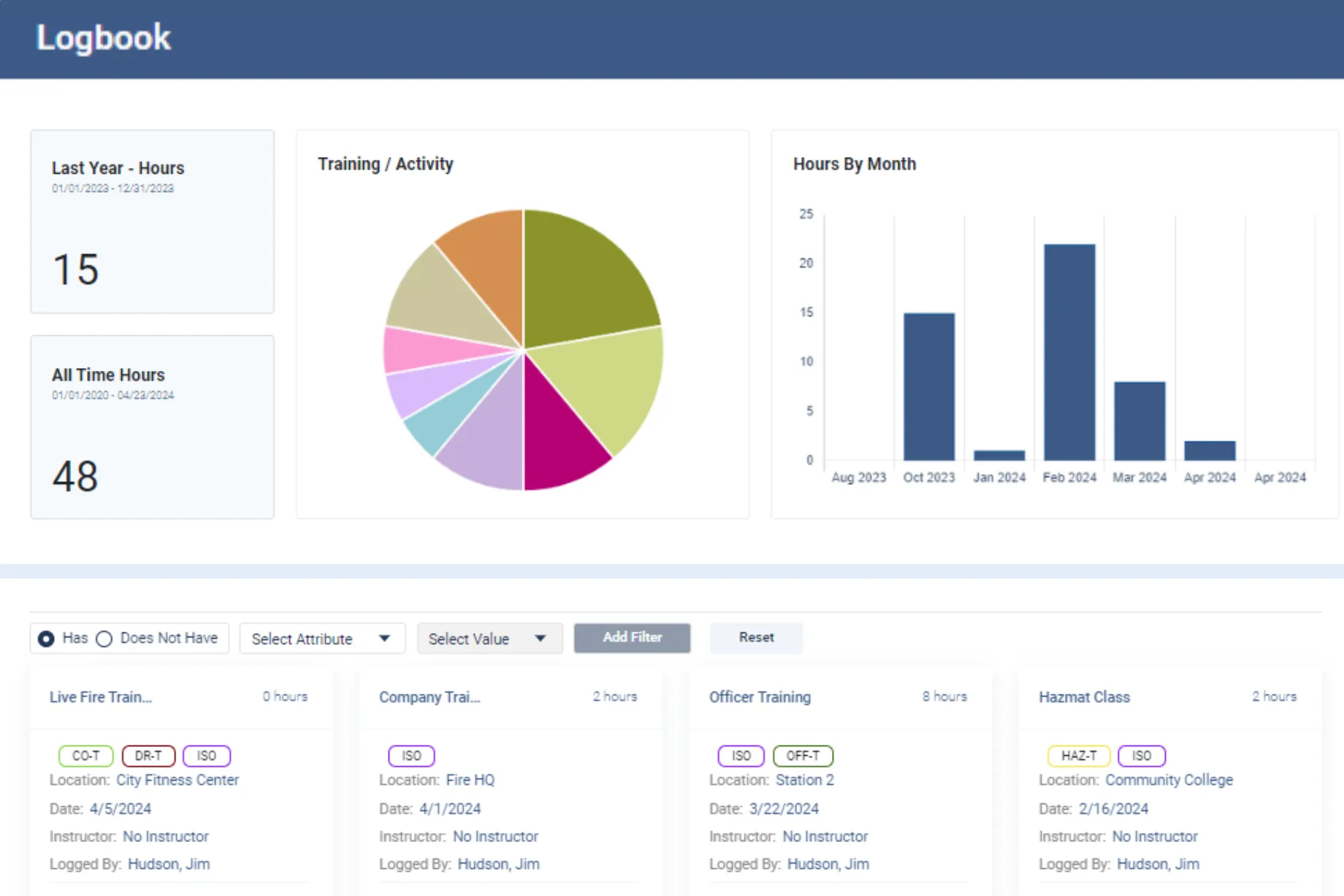
The features, as described on Essential Personnel's fire and EMS and talent management pages:
- Certifications: credentials, expirations, completions and source documents, with expiration notices.
- Logbook: training hours and activities against custom goals and benchmarks, with identifiers for sorting, filtering and reporting.
- Qualifications: task books, new employee check offs and specialty equipment check offs; officer development task books follow NFPA professional qualification standards.
- Events: training events with attendance and cost, integrated with Outlook and Google Calendar.
- Recruit and probationary tracking: structured evaluations rolled into Score Reports, which normalize scores between evaluators.
- Roster and Career Paths: filters by certification and qualification, and completion requirements mapped from the other modules.
- Integrations: Vector Solutions syncs credentialing information, Fire Engineering Training syncs e-learning and instructor-led training into the Logbook, ProdigyEMS integrates with the Logbook, and Synap adds online exams.
ISO company and driver hours and the evidence CPSE accreditation asks for are reports against that data, which is how West Manatee Fire Rescue improved ISO tracking. Online course delivery is the part Essential Personnel doesn't do; for that, see the comparison of EMS online training providers.
"We absolutely love this program. It has been a game-changer for us, and we are continuing to learn the added benefits. The EP team has been so attentive to our needs, and that means a lot to us."
Zach Hickman, Deputy Fire Chief, Iowa City Fire DepartmentSee your certification matrix and task books in it
Bring your certification list, one task book and a month of training hours, and we'll show you the 90 day lapse report and your ISO hours by category, live. Call (910) 390-0011 or email info@essper.com.
Frequently asked questions
Certification tracking with expiration alerts, logging a session once against every requirement it meets, ISO training reports by category, task books signed off against NFPA job performance requirements, and records with source documents and an audit trail. Then events, accreditation reports, probation tracking, a qualified roster, integrations, mobile entry and export. Essential Personnel covers the record side alongside your course provider.
NFPA 1401 is the recommended practice for fire service training reports and records, current in a 2026 edition. NFPA 1400 is the standard on fire service training. Task books usually follow the professional qualification standards: NFPA 1010 for firefighters, which replaced NFPA 1001, 1002, 1003 and 1005, and NFPA 1020 for officers and instructors, which replaced NFPA 1021 and 1041.
For maximum credit, Verisk's criteria call for 16 hours of company training per member per month, 18 hours a year at training facilities, 12 hours a year of officer continuing education, 60 hours for new drivers and 12 for existing drivers, a 6 hour hazmat session each year, and 240 hours per recruit in the first year. Without training records, there's no credit.
A learning management system delivers online courses and tracks their completion. Training management software is the system of record for all training: outside certifications, hands-on drills, task books, events and the reports ISO and accreditation ask for. Many departments run both, with course completions flowing from the LMS into the training record, which is how Essential Personnel is used.
Yes. Training records can be requested for insurance ratings, investigations, accreditation, grievances and lawsuits, and a department that can't show a member was trained has a hard time defending the decision to send them. Keep what was trained, when, for how long, who instructed and who attended, with the source document and a log of every change. Check your state's records retention schedule.
In one system that holds every credential each member has, state, national and agency, each with its own expiration date, the certificate attached and alerts before it lapses. Run a report of everyone lapsing in the next 90 days every month. Essential Personnel's Certifications module tracks credentials, expirations, completions and source documents, and filters the roster by who is current.
Yes. Certification and ISO training requirements usually apply whether a member is career, volunteer or paid on call, and combination departments often have the hardest tracking problem because members train at different times. Look for quick mobile entry and check how volunteers are priced, since most software charges per user, and ask about size based discounts.
The best fire department training software depends on whether you need course delivery, records or both. For the training record, Essential Personnel tracks certifications with expirations, task books, hours tagged to several requirements, events and a qualified roster, with published pricing of $85 per user per year for Talent Management. It runs alongside your online course provider rather than replacing it.

About this article
Written by Scott Monroe, Chief Executive Officer & Co-Founder, Essential Personnel. Published 2 November 2026.
Essential Personnel makes the software described here, and the product screenshot is from the platform. Pricing, feature and integration details are taken from essper.com, and the Iowa City quote is reproduced from essper.com. ISO training levels are quoted from Verisk, NFPA document titles and status from NFPA, CPSE details from CPSE, and the Eden Prairie findings from Becki White's Executive Fire Officer paper, all checked in November 2026. This article is general information; check your state's certification and records retention rules.
