
What should I look for in law enforcement personnel management software? 12 things to check before you buy
Most law enforcement software is built for calls, cases and shifts. Dispatch, records management, evidence and scheduling systems all do important work, and none of them is built to hold the record of the officer: their training and certifications, field training, evaluations, commendations, complaints, use of force, early intervention flags, wellness referrals, issued equipment and the policies they've signed. That record is what a promotion board, a civil claim, a prosecutor's Giglio request or an accreditation assessor asks for, and in many agencies it lives in four systems and a filing cabinet.
This guide is for police chiefs, sheriffs, professional standards commanders, training sergeants and the city IT and HR staff who help them choose law enforcement personnel management software. It explains how personnel software differs from the other police software you already run, sets out 12 things to look for with a test you can run in a demo for each one, and closes with a one page checklist, the red flags and what it costs.
The short answer: what to look for in law enforcement personnel management software
Look for one record per officer that holds training, certifications, field training, evaluations, commendations, internal affairs, use of force, early intervention, wellness, equipment and policy acknowledgements, so you can see all of it on one screen. Then check that sergeants will actually use it, that it's aligned with the FBI's CJIS Security Policy, and that the price and your exit terms are in writing.
The quickest test for any law enforcement personnel management software is to ask the vendor to open one officer's profile and show everything the agency knows about that person, live. Essential Personnel built its police software around that single officer record.
The 12 things below follow that idea from the top. Each one comes with a test, because a slide that says "training management" tells you nothing about whether the training sergeant can pull a list of lapsed firearms qualifications in ten seconds.
How law enforcement personnel management software differs from a police records management system, CAD and scheduling software
Police department software splits into a few categories that buyers often mix up. Computer aided dispatch runs calls, a police records management system holds incidents, arrests and cases, scheduling software runs shifts and overtime, and an HR or payroll system pays people. Law enforcement personnel management software holds the professional record of each officer, which none of the others are built to do.
| Police software category | What it holds | The question it answers |
|---|---|---|
| Computer aided dispatch (CAD) | Calls for service, unit status, dispatch times | Who is responding, and where? |
| Police records management system (RMS) | Incident reports, arrests, cases, persons, property and crime reporting | What happened, to whom, and is it reported? |
| Police scheduling software | Shifts, minimum staffing, overtime, leave and court time | Who is working, and what does it cost? |
| HR and payroll system | Pay, benefits, leave balances and job codes | Is the employee paid correctly? |
| Learning management system | Online courses and course completions | Did the officer finish the course? |
| Law enforcement personnel management software | Training and certifications, field training, evaluations, commendations, discipline, internal affairs, use of force, early intervention, wellness, equipment and policy acknowledgement | Who is this officer, are they qualified, and can we prove it? |
The national RMS functional standards, published with Bureau of Justice Assistance support, do give a records management system a personnel module, built around the duty roster, training and certification dates, issued equipment and threshold alerts. They don't cover field training, evaluations, wellness or policy acknowledgement, and they treat internal affairs as a separate, walled off module. Police scheduling software has a similar limit: it knows who is working, not whether they're qualified. That's why so much of the officer record ends up in spreadsheets. A generic HR system doesn't fill the gap either, because it has no idea what a field training phase, a use of force review or a firearms qualification is. The guide to generic HR systems covers that gap in detail.
So the first thing to look for is a product that sits in the last row of the table on purpose. Plenty of law enforcement software has a personnel tab. What matters is what's behind it: a roster and certification dates, or the officer's whole professional record.
1. One record per officer, on one screen
The most important thing to look for in law enforcement personnel management software is a single profile per officer that shows training, certifications, evaluations, commendations, corrective entries, internal affairs cases, use of force, injuries, wellness flags and issued equipment together, so a question about one officer is answered in one place.
The questions that reach a chief are never scoped to one module. A promotion challenge, a lawsuit, a public records request and a prosecutor's request for impeachment information under Giglio each cut across performance, training and conduct at once. If those records sit in four places, every answer is a project.
The test: pick an officer before the demo, send the vendor a sanitized version of their file, and ask to see it loaded on one screen. Then ask how many other systems in your agency, from the police records management system to the scheduling software, hold a copy of your roster today. Every one of them has to be updated when someone is hired, promoted, transferred or separated, and police department software bought one problem at a time is how agencies end up with four rosters and no single answer.
2. Police software that sergeants will actually use
Look for entry screens a first line supervisor can finish in a few minutes at the end of a shift. Sergeants write most of the observations, counseling entries and commendations an agency later relies on, so police software that only command staff touch produces a record that looks complete at the top and is empty underneath.
This is a usability question rather than a feature question, and it's where most rollouts fail. If writing a note takes five minutes, it happens. If it takes twenty, it doesn't, and the file is thin the day you need it.
The test: bring a patrol sergeant to the demo and have them, not the vendor, enter a counseling note and a commendation for a sample officer. Time it. Ask where that sergeant sees what their people have outstanding in training and qualifications.
3. Training records, certifications and qualifications
Look for training hours logged against your state's requirements, certifications with expiration dates and source documents, and qualifications such as firearms scores, task books and specialty check offs, with alerts before anything lapses. The record should answer who is out of compliance today without anyone building a spreadsheet.
Most states require a set number of in-service hours per cycle, and the officer's certification depends on meeting them. Your accreditation assessor and your state standards agency will ask for proof by person and by course. If an officer is decertified, the National Decertification Index kept by IADLEST is where other agencies will look, which is one more reason your own records need to be complete.
The test: ask for a list of everyone whose firearms qualification or state certification lapses in the next 90 days, and for one officer's in-service hours this cycle grouped by your state's categories. If course delivery matters to you, ask whether the system delivers courses or records them. Many agencies keep a course provider and want the personnel system to hold the record.
4. Field training and recruit progress
Look for daily observation reports your field training officers will complete every shift, phase evaluations, task checklists that follow the recruit across trainers and shifts, and reports that compare recruits across a class. Field training records should stay on the officer's profile after probation ends, not in a separate binder.
CALEA accreditation includes a standard for the field training program (33.4.3), and the program is only as defensible as its daily paperwork. A recruit released during probation, or one kept on who later fails, is a decision your agency may have to explain. The comparison of FTO software ranks the field training systems police departments use.
The test: ask a field training officer to file a daily observation report on a phone or patrol laptop during the demo and time it. Then ask how the system handles ratings from a hard grader and an easy grader, so a recruit's outcome doesn't depend on which FTO they drew.
5. Performance evaluations and promotions that hold up
Look for evaluations built from notes written during the year rather than from memory at the end of it, ratings that can be normalized across supervisors, and promotion requirements mapped to training and qualifications the system already holds. The goal is a promotion decision whose reasons survive a grievance hearing or a deposition.
The usual failure is familiar. A promotion is challenged, the agency reaches for the file, and the file is thin because supervisors documented verbally for two years. Evaluation software that only produces an annual form doesn't fix that.
The test: ask to see an annual evaluation that pulls in the year's notes, commendations and corrective entries automatically, and a list of who is eligible for sergeant today and what each remaining candidate still needs.
6. An early intervention system with thresholds you set
Look for an early intervention system that watches use of force, complaints, vehicle accidents, sick leave, critical incidents and other indicators across the same officer record, alerts the right supervisor when an officer crosses a threshold your agency sets, and records what was done about it.
An early warning flag is a prompt for a conversation, not discipline. The COPS Office's planning guide for early intervention systems notes that post-intervention follow-up "has received the least attention", and that's the part to test. CALEA includes a personnel early warning standard (35.1.9), and many states and consent decrees now expect one. The guide to early warning signs shows how departments set the indicators.
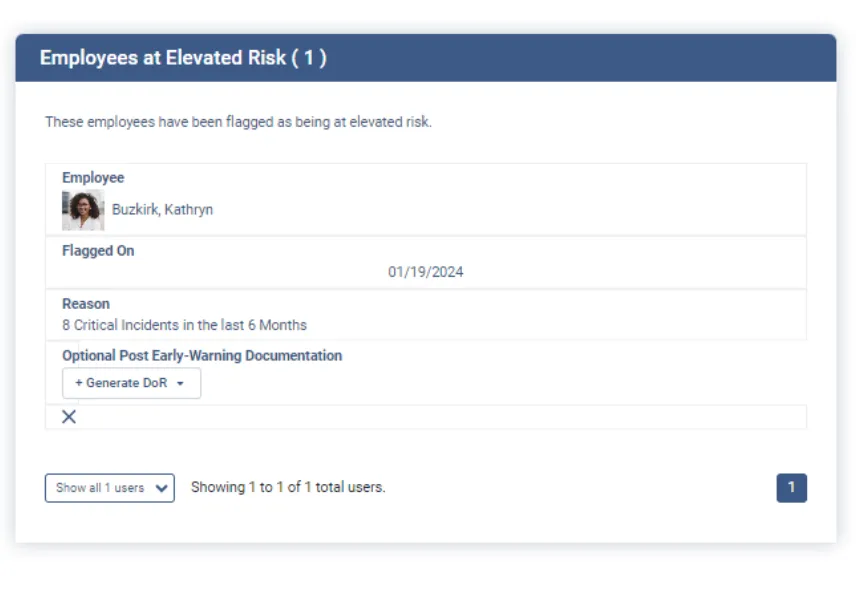
The test: ask the vendor to set a threshold of your choosing, such as three use of force reports in 90 days, enter the third report and show who gets alerted. Then ask where the intervention and its outcome are documented. Borrowed thresholds flag half of a small agency's roster, and supervisors soon learn to ignore them.
7. Internal affairs and use of force on the same record, with tighter access
Look for internal affairs case management and use of force review that sit on the same officer record as training and performance, with access restricted to the people who need it. Conduct kept in a separate silo can't feed an early intervention system or a promotion review.
A use of force event, a corrective entry and a run of traumatic calls can each look unremarkable alone and tell a different story together. Internal affairs software is often bought on its own for that reason, and the isolation is the problem. CALEA's chapter 26 standards on disciplinary procedures and internal investigations also expect secure handling of those files. The guide to comparing internal affairs software goes deeper on case workflow.
The test: log in as a patrol sergeant and confirm you can't see an open internal affairs case on one of your officers. Then log in as the professional standards lieutenant and show the same officer's use of force history beside their complaints.
8. Wellness records kept apart from discipline
Look for wellness and peer support records that are tracked on the officer but walled off from discipline, promotion and the general personnel file, with access limited to wellness staff. Officers won't use a wellness program they think will end up in their file.
Critical incident exposure, peer support contacts and referrals are worth tracking, because a run of bad calls is one of the clearest early signs an officer needs support. Keeping that record separate, and saying so in policy, is what protects it. The guide to officer wellness records covers how to document a program without those records reaching personnel files.
The test: ask who can see a wellness referral, whether it shows up in a public records export of the personnel file, and whether a supervisor can tell that a referral exists.
9. Policy publishing with versions and acknowledgement
Look for policy publishing that keeps every version, records which officer acknowledged which version and when, and assigns the right policies to new hires automatically. After an incident the question is what the policy said on that date and whether the officer had received it.
An agency that overwrote its policy file can't answer that question. Check, too, whether the vendor writes policy content or only publishes yours. They are different products, and some agencies need both.
The test: publish a revised use of force policy during the demo, then show the previous version, the list of officers who haven't acknowledged the new one, and one officer's full acknowledgement history.
10. Issued equipment tracked to the officer
Look for serialized equipment tracking with chain of custody to the officer, component level records for items such as a patrol rifle and its optic, light and suppressor, and expiration alerts for body armor. When an officer separates, you should be able to print everything they hold.
Weapons, vests, radios, body cameras and vehicles are expensive and sensitive. A separation audit is the immediate payoff, and a vest replacement schedule is the one most agencies keep on a spreadsheet.
The test: issue a rifle with three serialized components to a sample officer, then separate that officer and produce the return list.
11. CJIS alignment, hosting and access control
Look for hosting in the United States, alignment with the current FBI CJIS Security Policy, an independent SOC 2 Type II report, encryption in transit and at rest, multifactor authentication, role based access down to the record, single sign on with your city's directory, and a full audit log of who viewed what.
There's no such thing as CJIS certification. The CJIS Security Policy, now at version 6.1, sets requirements an agency and its vendors must meet, and your state's CJIS systems agency decides whether a vendor's controls satisfy them. A vendor that calls itself "CJIS certified" is telling you something about how carefully it answers questions.
The test: ask for the SOC 2 Type II report and the CJIS Security Addendum before the contract, and ask to see the audit log for one officer's internal affairs file.
12. What police department software costs, and getting your data back
Look for a published or written per user price that covers every module you need, the one time setup fee, single sign on and support, a cooperative contract your purchasing office can use, and a clause that says how you get all of your records back, in a usable format, if you leave.
Law enforcement software is often quoted module by module, so the total only becomes clear after the third add-on. Ask for a five year price for your headcount in writing. Police department software for a small agency and a large one is usually priced the same way, per user, so the headcount drives the total. If your city prefers a cooperative contract, ask which ones the vendor is on, such as GSA Advantage, NASPO, Omnia Partners or a state sheriffs' association contract.
The test: ask the vendor to export one officer's complete record during the demo, in a format you can open without them.
The checklist: what to look for in law enforcement personnel management software, and how to test it
Use this checklist in every demo of law enforcement software. Send each vendor the same sanitized sample a week ahead, five officers with their training, one field training file, one use of force report and one policy, and ask each vendor to run the same tests in the same order while you score them.
| Look for | Ask them to show you |
|---|---|
| 1. One record per officer | Everything about one officer on one screen |
| 2. Built for sergeants | A sergeant entering a counseling note, timed |
| 3. Training and certifications | Everyone whose qualification or certification lapses in 90 days |
| 4. Field training | An FTO filing a daily observation report, and a class comparison |
| 5. Evaluations and promotions | An evaluation built from the year's notes, and who's eligible for sergeant |
| 6. Early intervention | A threshold you set, triggered, with the intervention documented |
| 7. Internal affairs and use of force | A sergeant blocked from an open case, and force beside complaints |
| 8. Wellness | Who can and can't see a wellness referral |
| 9. Policy | A revised policy, the old version, and who hasn't acknowledged |
| 10. Equipment | A rifle and components issued, then returned at separation |
| 11. CJIS and security | The SOC 2 Type II report, the CJIS addendum and an audit log |
| 12. Cost and data | A five year price in writing and a full export of one officer |
Bring the training sergeant, a patrol sergeant, the professional standards commander and someone from IT to every demo. Score each police department software vendor out of five on every row, and weight the rows that match the problem that started the search.
Red flags when buying law enforcement software
Be wary of law enforcement software vendors who won't load your sample data, describe an integration without saying what moves, call themselves CJIS certified, quote module by module without a total, or can't show you how to export an officer's full record.
| What you hear | What to ask next |
|---|---|
| "We're CJIS certified" | There's no CJIS certification. How do you align with the CJIS Security Policy, and can we see your SOC 2 Type II report? |
| "Our RMS has a personnel module" | Show me one officer's field training, evaluations, use of force and equipment on one screen |
| "We integrate with your systems" | Which fields, in which direction, how often, and who fixes it when it breaks? |
| "Early warning is included" | Can we set our own thresholds, and where is the intervention documented? |
| "Pricing depends on your needs" | What's the five year total for our headcount, in writing? |
| "You own your data" | Export one officer's complete record now |
How Essential Personnel measures up as law enforcement personnel management software
Essential Personnel is law enforcement personnel management software built on one record per officer, covering training, field training, evaluations, early intervention, internal affairs, wellness, policy and equipment. It doesn't do dispatch, records management, scheduling or policy writing, so it runs beside those systems rather than replacing them.
Here's how it answers the 12 things above, taken from its law enforcement page, its security page and its published pricing:
- One record and sergeants: Employee Profiles hold the officer's whole record, and sergeants enter observations, counseling and commendations through Leader's Notes as they happen.
- Training: Logbook for hours against custom goals, Certification Management with expirations and source documents, and Qualifications for task books, check offs and weapon scores.
- Field training: a daily observation report template in Leader's Notes, with recruit progress rolling into Score Reports that normalize ratings for hard and easy graders. Carteret County Sheriff's Office digitized its field training program this way.
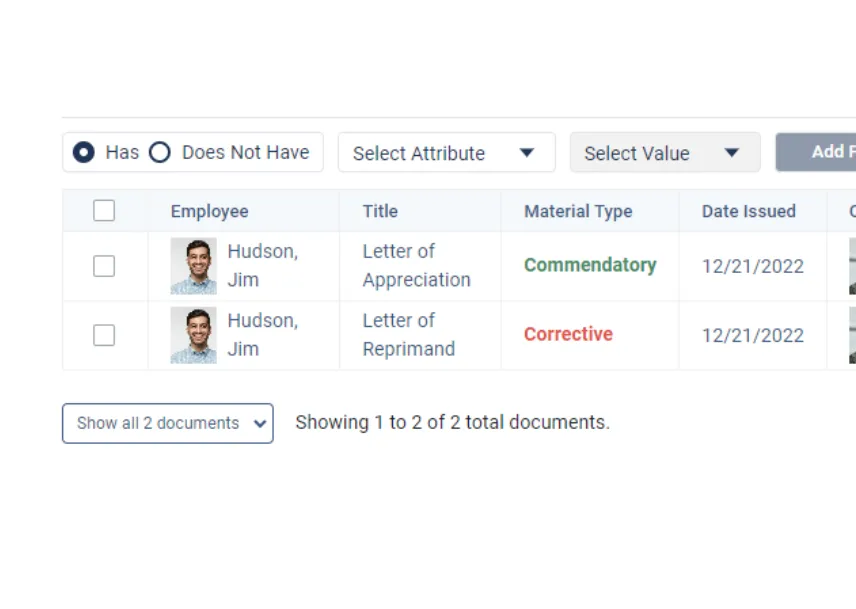
- Evaluations and promotions: Leader's Notes, Score Reports, 360 Feedback, Documents of Record, Awards, Career Paths and Promotion Eligibility.
- Early intervention, internal affairs and wellness: Incident Tracking, Case Management, Early Intervention and Wellness Profiles in the Safety and Wellness suite, on the same officer record.
- Policy: Guidance publishes policies and memos with version control and acknowledgement tracking, and assigns policies to new hires. It doesn't write policy content.
- Equipment: serialized inventory with assignment tracking, audit logs and expiration notices.
- Security: hosted in AWS GovCloud in the United States, aligned with the FBI CJIS Security Policy, SOC 2 Type II maintained annually, FIPS 140-3 validated encryption, multifactor authentication and optional single sign on.
- Cost: $175 per user per year for all four suites, or $20 to $85 per suite, plus a one time $3,000 setup fee and $800 a year for single sign on. Available through GSA Advantage, NASPO, Omnia Partners, NCSA and VSA.
Things to confirm with Essential Personnel in a demo, as with any vendor: the direction and scope of each integration, mobile access for your FTOs, and your specific state or consent decree reporting obligations, which no police software can interpret for you. Scheduling stays in your scheduling software, and Essential Personnel connects to Aladtec. For a ranked view of the vendors, see the comparison of police performance software.
"The Essential Personnel staff are true partners, and acquiring the software has been transformative for our department. What truly sets them apart is their willingness to customize the platform to perfectly fit our unique operational needs. This level of responsiveness and flexibility has dramatically improved our training tracking, wellness monitoring, equipment management, and overall accountability, allowing us to focus on serving our community rather than wrestling with a rigid software system."
Michael Petti, Major, Fayetteville Police Department, North CarolinaRun the 12 tests with your own data
Send us five sanitized officer files and one field training file, and we'll run every test on this checklist live, with your records loaded. Call (910) 390-0011 or email info@essper.com.
Frequently asked questions
Look for one record per officer covering training, certifications, field training, evaluations, internal affairs, use of force, early intervention, wellness, equipment and policy acknowledgement. Check that sergeants will use it, that it's aligned with the FBI CJIS Security Policy, and that pricing and data export terms are in writing. Essential Personnel is built around that single officer record.
A police records management system holds incidents, arrests, cases and crime reporting about the people an agency deals with. Personnel software holds the professional record of the agency's own officers: training, certifications, field training, evaluations, discipline, use of force, early intervention and equipment. Most agencies need both, because RMS personnel modules center on the roster and certification dates.
Usually not. A generic HR system is built for pay, benefits and leave, and it has no concept of a field training phase, a firearms qualification, a use of force review or an early intervention threshold. Most police departments keep the city's HR system for payroll and add law enforcement personnel management software for the officer's professional record.
There's no CJIS certification. The FBI CJIS Security Policy, now version 6.1, sets controls for systems that handle criminal justice information, and your state's CJIS systems agency judges whether a vendor meets them. Ask for US hosting, encryption in transit and at rest, multifactor authentication, audit logs, a SOC 2 Type II report and a signed CJIS Security Addendum.
Small departments face the same promotion challenges, lawsuits, Giglio requests and accreditation reviews as large ones, with fewer people to rebuild records by hand. That burden usually falls on one administrator with a spreadsheet. Per user pricing makes police department software scale down, so a small agency can size the cost before talking to a vendor when pricing is published.
Most vendors quote privately, often module by module. Essential Personnel publishes its pricing: $175 per user per year for all four suites, or $20 to $85 per suite, plus a one time $3,000 setup fee and an optional $800 a year for single sign on. Ask every vendor for a five year total for your headcount in writing.
It helps. Field training records, evaluations, use of force, complaints and critical incidents all describe the same officer, and an early intervention system can only spot patterns across the records it can see. Keeping them on one profile also means a recruit's field training file follows them after probation instead of staying in a binder.
Your own sanitized data, loaded before the demo. Ask to see one officer's full record on one screen, a sergeant entering a note, the 90 day certification lapse list, an FTO filing a daily observation report, an early intervention threshold being triggered, restricted access to an internal affairs case, and a full export of one officer's record.

About this article
Written by Scott Monroe, Chief Executive Officer & Co-Founder, Essential Personnel. Published 3 November 2026.
Essential Personnel makes the software described in the last section, and the screenshots are from the platform. Pricing, hosting, module and purchasing details are taken from essper.com, and the Fayetteville quote is reproduced from essper.com. The CJIS Security Policy version is taken from the FBI, CALEA standard numbers from CALEA's published standards lists, and the Giglio policy from the Department of Justice Justice Manual, all checked in November 2026.
